
Hi, I am new to Quire and used to work with other tools like this, but have still not found something satisfying. Now, I have to say that Quire has made a great impression 😃
If Quire is great to do project management, I am still looking for a way to plan things on a day basis. I mean, set a list of tasks on which I will focus today, exclusively - and hide the others. My roadmap for the day to come.
- I could use sublist for that. But unfortunately, sublist is only showing tasks from one (its) project. And guess what ? I need to work on several projects a day.
- I could use subfolders, in order to get tasks from several projects. But there is a limit in number of projects - I cannot include all my projects, so.
- Last option is to use My Task view, in order to see all my tasks, in all projects at once, and decide which ones I want to deal with today. But AFAIK, there is no way to select some tasks and flag them for "today".
I figure I can find out a tricky way, to work it out, like :
- create a #today tag
- create a
todaynew status But this is only a workaround, not really proper…
Moreover, it would still miss other helpful features, like assigning kinda weight on each task. The idea here is to set a limit to the total weight of tasks in a day, and so, to make a wise selection of tasks to keep the weight reasonable. Weight could be an arbitrary number. For instance, you can estimate a task will cost 3 points, another task 2 points. By selecting them both, you have a total of 5 points that will weigh on your day - and with a limit of 15 points a day, you are good and can add other tasks in your playlist :-)
Of course the idea behind this will quickly make you think of weight like actually being a period of time… And then you will quickly also think of Pomodoro technique ! :D
Good idea ! So, yes, what about implementing Pomodoro method in Quire ? With :
- assigning weight to tasks
- set a countdown when starting to work on a task (typically 20min, in Pomodoro. But this might be different for people).
Ok. So it was a long post, sorry for that ^^
Long life to Quire.
I was about to write a request going into a similar direction, as this is about the one thing I miss from this otherwise truly awesome app!
My idea/wish for this issue is to enhance the time estimate feature:
(Disclaimer: I'm currently using Quire on my own, so I can't really tell how my ideas would pan out in a collaborative environment. Also, I'm still quite new to it, so please excuse me, if I write about something that already exists)
Likely easy to implement (these alone would already help A LOT, imo):
- In the timeline view, put the additional information (advanced view), esp. the time estimation, into individual columns, instead of having them trail after the task name. Personally, I'd prefer a view with just the task name and the estimated time alone.
- In the timeline view, show the priority icon next to the task name like in the list view.
- In the time report view in the task list, show the estimated time and/or the +/- difference to the actual duration for each task.
Maybe easy to implement, but would be really helpful too:
- Add the option to "zoom out". I'm a very visual person, so even if I won't be able to read the labels anymore, just seeing the overall picture of the different "lines" and "dots" of tasks would really help me envision the schedule I have ahead of me.
Probably more difficult to implement, but in my opinion helpful to allocate tasks on the timeline and determine the feasibility of a plan:
- Sum up estimated times per day to determine how many tasks I can fit into a day
This would work for just today (what HDpro wished for) or for roughly spreading the pending tasks (preferably broken down into tasks estimated to take less than a day) across the days of the current month to see how tight my schedule is (my use case).
I think the timeline view is best suited for such tasks. Thus, I'd love to have the following additions to the timeline view:
- In line with the pomodoro and other agile techniques, distinguish between "over-reaching" tasks (estimated to span more than 1 day) and "single" tasks (estimated to take less than 1 day; actually, the smaller the better) --> needed to make tasks "assignable" to a day: the "single" tasks. Over-reaching tasks would need to be split into smaller subtasks or require some other handling (see below)
- Sum up the estimated times for all "single" tasks allocated on a certain day and display it below the date (turns red or gives some other warning if it exceeds the daily max, which should be editable).
- Could have the "single" tasks allocated for today summarised somewhere, e.g.:
- Treat as a new status category and add an extra column in kanban view between the todo and in progress called "Today's Tasks" or something. Pro: would nicely integrate with the double-piechart diagram in the overview tab (it would appear on the inner circle but as part of the yellow category (today). Con: "chosen for today" does not 100% identify as a status, requires automatic labeling and delabeling of tasks with the status "today's task".
- Add a third chapter in the Overview tab and list it there. Pro: prominent location, independent of existing categories. Con: adds another new "dimension"
- What to do with the "over-reaching" tasks that have not yet been split into "single" subtasks would still require some thinking about...
- Spread the estimated time across all days evenly? May lead to unrealistically small/big periods per day.
- Fill up the days after the start date that have still time left? This would probably require the automatic generation of some sort of tentative "single" subtask.
- Allow some sort of manual tentative placing? Maybe this could be realised by a tool that would allow the creation of some default tentative "single" subtask with a specified estimated time by clicking into the timeline...
- Not include them into the daily estimate calculation at all? May actually not be such a bad idea, as having some "gray area" can be a good thing.
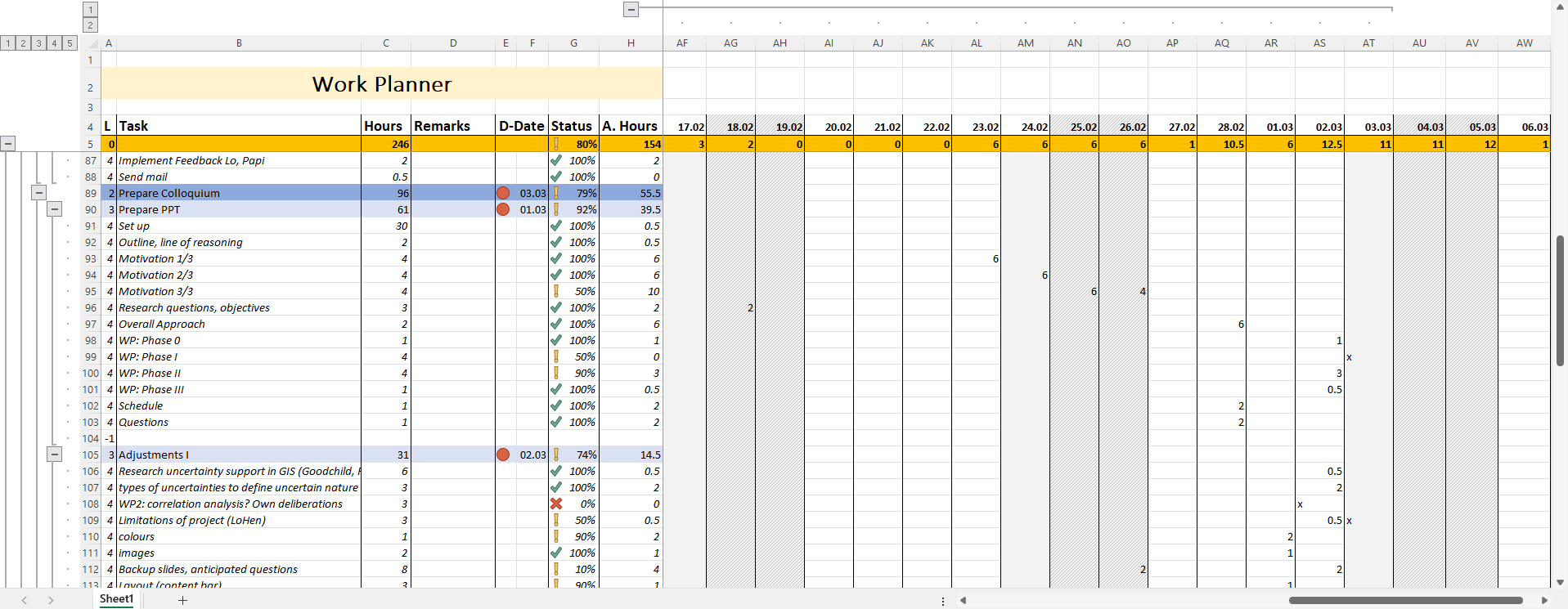
Until now, I've been doing something like this in Excel, first adding x's on the day's I'd planned to work on a task and then later filling in the hours I'd actually worked on it (see attached pic). However, adding subtasks, and still correctly summing up the estimated times (and also the actual times worked on them) was a nightmare 🙈. And naturally, it was missing all the other sweet extra stuff this app has. It was to the point, I'd actually started thinking about programming my own. Because all other planning apps I'd checked out either didn't have such convenient adding and organising of tasks and subtasks or were missing the feature to actually record when and how long I've worked on a task. Which I think is really important for me to know to improve my project management. So, when I discovered Quire, I was all excited. I'm LOVING the inline edit and the peekaboo feature and having an integrated pomodoro timer is just PERFECT! Now all it in my opinion needs are some enhancements regarding the scheduling part 😁
K. Henggeler, Apr 1, 2023
Really like this idea. Any response? Thx
Neil Hart, Jul 10, 2021
Hi Neil - Thanks for the update. We will look into this. 👍
Peggy, Jul 27, 2021
I just checked it out - this is great! Thank you! Looking forward to future updates! 😃
K. Henggeler, Sep 26, 2023
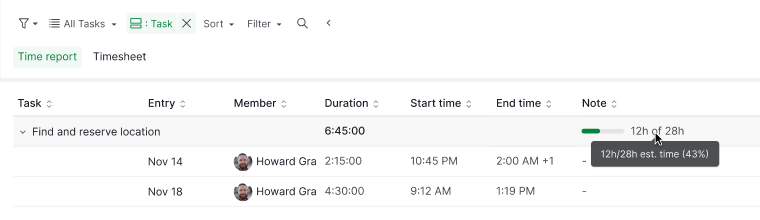
Hi K Henggeler, Now you can display the estimated time and compare it with the actual time spent on each task in the Time report.
To show the estimated time in the Time report, set the filter settings to Group by Task. For more details, please see our guide here.
Thank you.
Golda, Jun 2, 2023
FYI ClickUp has something similar looking in the 'Line Up' feature (not saying this is perfect, but initially looks decebnt enough for starters).
Neil Hart, Jul 20, 2021
I am glad to see there is finally some news here - and support 😃 Am eager to test first releases including some of these features.
HDpro, Aug 12, 2021
Hi Golda, Thanks a lot for your detailed answer - I wasn't expecting that! I also wasn't aware of the grid view functionality, that's a really nice feature I was missing out on, thanks!
Thank you also for the workaround suggestion regarding the summing up of estimates. Unfortunately, that doesn't really work for me, as my list of "today's tasks" consist of subtasks of various different already existing parent tasks. Say, I have a level 1 subtask of main task A, a level 4 subtask of main task B and two level 3 subtasks of main task C that I have planned for today and I'd like to know whether I'll be able to fit them into one day. The same for tomorrow, the day after tomorrow, and so on. To see whether my planned schedule is feasible.
On that note, the new sections functionality actually gave me some new options/ideas: Up until now I'd been using sublists as "sections" - which probably wasn't what they were intended for though. Anyway, now that I've freed my "sublist dimension" by converting all my sublists into sections, I realised that I can now use a dedicated sublist to summarise the tasks I'd allocated for today. This is even better than treating them as a new status category and doesn't even need any new functionality. My wish for a way to sum up time estimates per day still remains, though. I thought whether being able to sum up estimates for an entire sublist would help in this regard. But to be honest, that feels more like an interim solution or workaround. While it might be useful in some cases, being able to sum up estimates per day in the timeline view still sounds more logical to me.
Anyways, those are just my thoughts as a user on the matter that I wrote in the hopes of being able to provide useful feedback for you. I'm naturally well aware, that you won't be able to implement all of that. This is just my personal opinion after all, and there will be other (more pressing) issues too.
K. Henggeler, Apr 19, 2023
Hi K Henggeler, Thank you for your feedback.
In the timeline view, put the additional information (advanced view), esp. the time estimation, into individual columns, instead of having them trail after the task name. Personally, I'd prefer a view with just the task name and the estimated time alone.
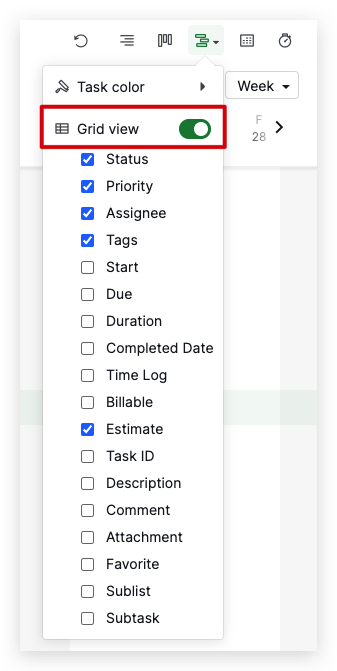
You can display the estimated time in the Timeline view. Click on the Timeline view icon and toggle on Grid view. You can choose which column you want to show in the dropdown menu.
In the timeline view, show the priority icon next to the task name like in the list view.
You can also show the priority by toggling on the Grid view in the Timeline view.
In the time report view in the task list, show the estimated time and/or the +/- difference to the actual duration for each task.
We currently do not support showing estimated time or the +/- difference to the actual duration for each task in the time report. I will bring this feedback to our Product team for further discussion.
Add the option to "zoom out". I'm a very visual person, so even if I won't be able to read the labels anymore, just seeing the overall picture of the different "lines" and "dots" of tasks would really help me envision the schedule I have ahead of me.
We currently do not support zooming out in the Timeline view. I will also let our team know about this feedback.
Sum up estimated times per day to determine how many tasks I can fit into a day
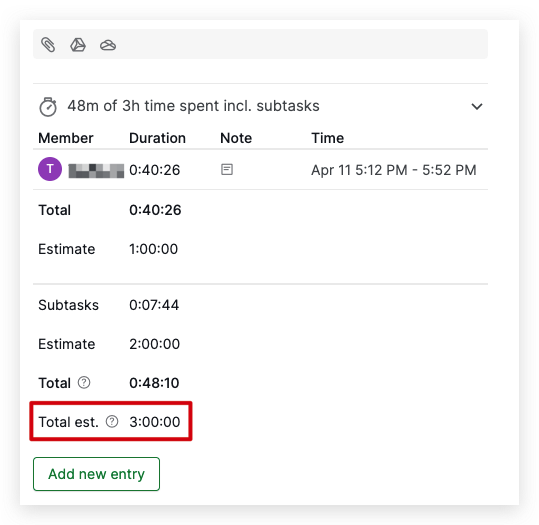
While we don't currently have a feature that allows you to sum up estimated times per day, you can use a workaround to achieve this. By creating subtasks under the same parent task, and add estimated times to the parent and subtasks, you can view the total estimation time by opening the detail panel of the parent task. You can also toggle on the Advanced mode and hover over the parent task.
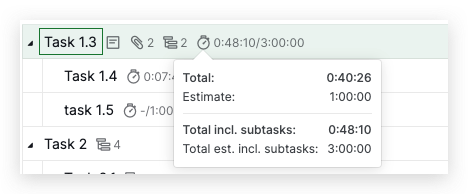
Regarding the over-reaching or single tasks suggestions, I will bring your feedback to our Product Team for more discussion. However, I cannot promise you that this improvement will be picked up or implemented soon, as our team is currently working on multiple projects. I will keep you posted on any updates in the future. Thank you.
Golda, Apr 11, 2023
Hi - As far as I know, we don't have an update to this request yet. We do think that this is an interesting idea, to be able to select the tasks that you would like to focus on on a daily basis. I will bring it to our team again and hopefully it can respark some discussion on this suggestion.
About assigning weight to a task, I think when we have 'Custom Fields' in the future, it might be a solution to this. You might be able to create a new column called 'Weight' and enter the points for each task, then our system can sum up the total weight for the selected tasks. (#2570)
About having countdown or Pomodoro, yes, this is in our consideration for our future enhancements. We have a thread in Quire Feedback regarding this: #2676. We shall keep everyone posted when we have an update.
Peggy, Jul 20, 2021
No worries 😏 PS have recently started grouping My Tasks by date (esp. day/week etc) which is great. One thing I've often noticed with other tools like Asana is there's no real way to distinguish between due (and start) dates and actually DOING dates, i.e. I've decided to actually WORK on this task today/this week. If this were somehow an option, you could then use the same grouping in My Tasks without affecting the REAL due dates (which I tend to find more often than not become when I will DO something not when it actually NEEDS to be completed. Make sense/any thoughts?
Neil Hart, Jul 27, 2021
Hi Neil - To my understanding, you are looking for a way to mark tasks as ' need to WORK ON' and having a way to group these tasks in one section. So when you are in My Tasks, in one glance, you would be able to know what you need to work on right now. Am I correct?
The current workaround would be creating a new tag and adding them to these tasks, then to filter by tag. I understand that this isn't a clean solution for this request. I will explain your case to the team and if we have any updates, I will keep you posted.
p.s. I apologize because I'm having trouble understanding the below part you mentioned, could you please kindly give us an example or explain more? Thanks. 😭
(which I tend to find more often than not become when I will DO something not when it actually NEEDS to be completed.
Peggy, Aug 12, 2021
Thanks Peggy. You've already understood TBH. Basically: I typically use DUE dates for when I PLAN to do/work on something NOT when they're ACTUALLY due. When there isn't a hard deadline, this is fine (although I often find myself bumping these dates back again and again when other work takes precedence. In theory I could use the START date for this instead, only don't think it's as easy/possible to group or sort by this? Either way, an actual DO DATE field would be very helpful and potentially an easy way to accomplish this (and the original request above) without having to create any new functionality? Let me know if this helps 😃
Neil Hart, Aug 12, 2021