
How_to_use_this_template
📖 How to use this template
A portfolio of capital projects in one table: every building, machine, system or piece of land the company is buying or building, what was approved for it, what has been committed to vendors, and what has actually been paid. Each root task is one capital project. Its subtasks are the lifecycle phases from business case to close-out.
The sample is a mid-size manufacturer with nine projects: five in flight, three in next year's pipeline, one closed.
- Duplicate this project into your own organization (dropdown next to the project name, then
Duplicate)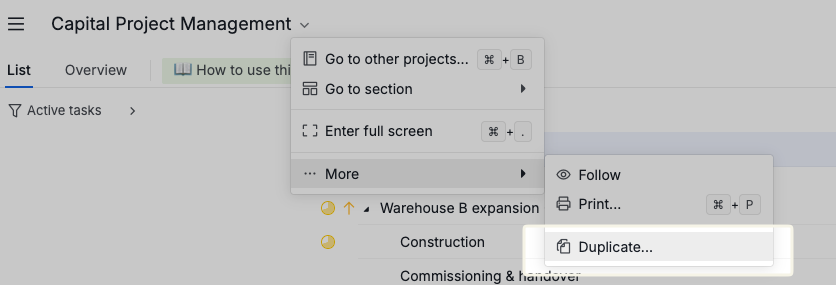
- Delete the nine sample projects and add your own, one root task per capital project. Keep the phase subtasks or copy them from a sample project before deleting it
- Fill in Approved Budget when a project is funded, and set its status to Approved. Until then, note the requested amount in the description, as the three pipeline projects do
- Update Committed every time a PO or contract is signed, and Spent to Date as invoices are paid. Remaining Budget, Spent (pct) and Budget Health recalculate on their own
- Move the status forward as the project passes each gate. Move the task between sections when it enters the active portfolio or gets closed out
The fields
| Field | What it holds |
|---|---|
| Project Code | Your internal CapEx reference, e.g. CAP-26-001. Finance will ask for it |
| Asset Type | What is being acquired: Building & Facilities, Equipment & Machinery, Infrastructure, IT & Systems, Vehicles & Fleet, Land |
| Funding Source | Where the money comes from: internal cash, bank loan, bond, grant, lease financing |
| Approved Budget | The amount authorized at funding approval. Change it only through a formal budget change request |
| Committed | Total value of signed POs and contracts, whether or not paid yet |
| Spent to Date | Invoices actually paid |
| Remaining Budget | Approved Budget minus Committed. Formula |
| Spent (pct) | Spent to Date as a whole-number percentage of Approved Budget (55 = 55%). Formula |
| Budget Health | 🟢 On track under 90% committed, 🟡 Watch between 90% and 100%, 🔴 Over-committed above 100%. Formula |
Committed is the number to watch, not Spent to Date. A project that has signed contracts for more than its budget is already over, even if the invoices have not arrived. That is why Remaining Budget and Budget Health both key off Committed.
Status is the lifecycle
The statuses are the gates a capital project passes through:
Not started → Business Case → Approved → Design → Procurement → Execution → Commissioning → Closed-out
Plus two side exits: On Hold and Canceled. Switch to Board view grouped by status to see the whole portfolio as a pipeline.
Phase subtasks use the same statuses. A finished phase is Closed-out, the current phase carries the same status as its parent, and future phases stay Not started.
Tags are the justification
Every capital request has a reason. Tag it: Growth, Replacement, Safety & Compliance, Cost Saving. Add Needs Board Approval to anything above your board's approval threshold so it does not slip through on a manager's sign-off alone.
Reading it
Switch to Table view. Sort by Budget Health to bring the red rows to the top. Filter by section to look at the active portfolio alone, or by Funding Source to see how much of the year is riding on a grant that has not landed yet.
Sum the Approved Budget column for your total authorized CapEx, and Committed for how much of it is already spoken for.
Adapting it
The three sections are a portfolio split by time: active, pipeline, closed. If you plan by fiscal year, rename them FY2026, FY2027, FY2028. If you plan by site or business unit, rename them to that instead. The fields and statuses do not care.
If your finance team tracks forecast at completion, add a Forecast money field and change the Budget Health formula to compare it against Approved Budget instead of Committed.
The 90% threshold in Budget Health is a convention, not a rule. Tighten it to 0.95 for a portfolio of small, predictable projects; loosen it for construction, where change orders are normal.