
How_to_use_this_template
📖 How to use this template
One queue for every design request, from the moment somebody asks to the moment it is signed off. The sample holds seventeen requests mid-flight.
- Duplicate this project into your own organization (dropdown next to the project name, then
Duplicate)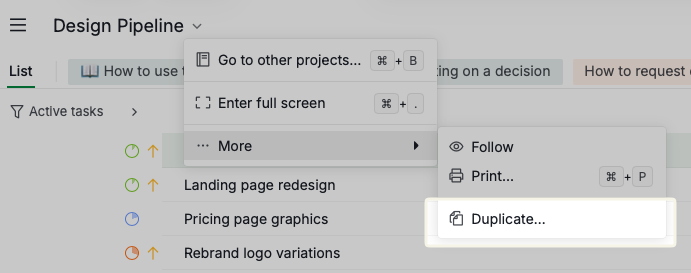
- Send your requesters to the How to request design work document. That is the one that stops the same direct message arriving every week
- Set your real reviewers on the Creative sign-off approval category in project settings
- Delete the sample requests, keeping the statuses, the tags, both sublists and the three fields
- Add your live requests, filling in Requested by and Why this date on each one
It is a queue, not a plan
There are no phases and no sections. Every request is a single flat task, because a design queue is not a project with a beginning and an end. Sort or filter it, do not try to structure it.
The two sublists to watch
- Intake: not triaged — requests that have arrived and have not been accepted, sized or scheduled. A request lands here the moment someone asks, so the queue exists in writing before anybody argues about priority.
- Waiting on a decision — finished work sitting with an approver. Nothing here needs a designer, it needs somebody to say yes or say what to change. Read it by age, not by length.
The three fields
- Requested by — who asked. Not the designer, the person who wants it.
- Why this date — the reason behind the deadline, not the deadline itself. "Printer cutoff is 16 Jul" is a date you can plan against. "ASAP" is not.
- Review round — how many times this has come back. Round one is normal, round two is fine, round three usually means the brief was wrong rather than the work.
The flow
Requested → In Design → Internal Review → Awaiting Approval → Changes Requested → Delivered.
Internal Review exists so the approver's round one is not spent on things the team could have caught themselves. Delivered is the only status that counts as complete.
Tags are the kind of work
social, web, print, brand, video, email, and rush. Filter by tag when you need to see one type of work on its own, and use rush sparingly, because a queue where everything is urgent has no order left in it.