
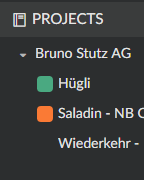
I notice that not all my projects have colors on the side.
This is someting that we can set on?
Hi Antonio, Thanks for this comment. We shall think about this, I will bring this to our team.
Peggy, Mar 11, 2019
Hello, quick comment about the colors. I'm not so thrilled about the fact that quire creates a random color for them. Because Quire lacks some of the basic reporting across my entire account (I'd love to see a progress report for all organizations and projects); I set the colors to Green if I haven't started yet; Orange if it's In Progress; and Red if it's Complete. That helps me get some kind of idea of where I'm at with everything by looking at the left side panel. What would make things easier is if we could Right-Click on the color in the side panel and change the color (Asana can do this). It would also be helpful if we could Right-Click on the project name and make updates to it. With a lot of projects, it's very tedious to get into the Project -> Options -> General screen for each project to make these changes.
Antonio, Mar 9, 2019
Hi José, In a project’s Settings (after you click on the arrow beside the project name & select Settings), you will find that you can add an icon for the project in the General tab, and highlight it in the sidebar by enabling the option “Highlight this project by displaying its icon…” in the Options tab.
Crystal, Jul 2, 2018
I found it, thanks a lot
(deleted-Jos*s), Jul 3, 2018