
Hi Ivo, I have just tried, when I am duplicating a task(s) that already has the “To-Do” status, the option “Reset all statuses to To-Do” did not appear. The Feedback button is under Help after clicking on your profile icon in the upper-right.
Crystal, Jul 26, 2018
When duplicating a task a new option shows "Reset all statuses to To-Do". It works confusing as it might suggest not all tasks have the "To-Do" status.
It might be an option to hide this thickbox when all tasks already have the "To-Do" status. E.g. only show this option when there are "In Progress" of "Completed" tasks.
I do realy like the option thought!!!!
Ivo Meisen, Jul 24, 2018
Hi Ivo, Still not able to reproduce it at my end. 😞 I see that you are in the All Tasks view. It could be you have selected a task or subtask with status "Completed."
Crystal, Aug 13, 2018
⭐️ We have closed your thread in order to optimize the performance of the Quire Feedback Forum. Please see our Quire Feedback Official Guideline for more information.
If the request/feedback wasn’t answered, please leave a comment below, the Quire team will be notified. Thank you.
Peggy, Jun 24, 2021
HI Crystal, it looks like there is some quirky thing in one of my tasks but I can't find it. I have this issue only on a single task tree. All other tasks don't show this option.
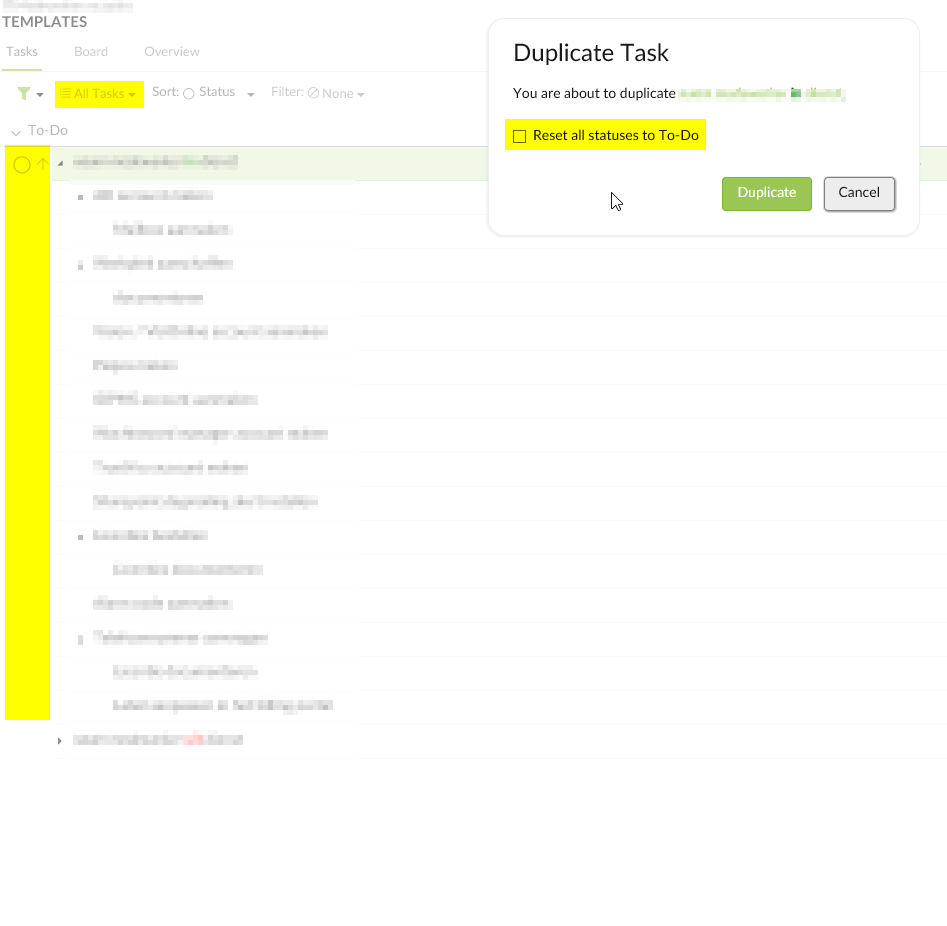
Ivo Meisen, Aug 9, 2018
Hi Ivo, It could be that you want to duplicate eg., task A (with status To-Do) and task B (with status In Progress) that you see this option.
Crystal, Aug 10, 2018
ow btw, I had a hard time finding the Feedback button from within a project. Is it gone?
Ivo Meisen, Jul 24, 2018
Hi Crystal, i dubbel checked, non of the tasks have another status then to-do
Ivo Meisen, Aug 10, 2018