
can we please have the option to have MyTasks list to toggle on the start date or due date and the added option of a scheduled date
Hi Crystal
found the date format - thanks in regards to the scheduled date, it is an added date so that it doesn't change the start date or due date - they need to remain the same otherwise it will change the dates the tasks are regenerated. In regards to the My task list, they currently according to the due date, so have the preference of being able to see that list sorted on due, started or scheduled. At the moment I am currently using favorites to gather the tasks that I have scheduled complete this week, otherwise they are buried in upcoming, later etc...
regards Jacquie
Jacquie Mitchell, Aug 24, 2018
Hi Jacquie, this feature is available now and you should be able to see start dates being applied to tasks under My Tasks. 😃
Michelle, Dec 19, 2018
Hi Wayne, it appears like it may be complicated for most users. It could be the reason why other task managers do not include all four types. We shall merge the reminders with the schedule date in the future.
Michelle, Jan 2, 2019
Hey @michelle-28, if I understand @jacquie-94 correctly, what she's looking for is the same thing I'm looking for.
A task really needs 4 different kinds of dates associated with it:
- Start date
- the date the task is eligible to be started (not that it necessarily will start that day, just that it's eligible to)
- Due date
- pretty self-explanatory
- Scheduled date(s)
- when I actually want to work on the task (presumably between the start date and due date)
- Reminder(s)
- when/where I want to be reminded about the task
I have been searching and searching, and I cannot find a task manager that includes all 4 of these dates. As I think about it right now, the most I've found is two. I've seen apps with reminders, scheduled dates, and of course start and due dates, but never all together. Perhaps that means that I just don't know how to properly manage/schedule tasks, lol, but to me, those seem like 4 distinct use cases for a date in relation to a task.
I use the start and due date to keep track of my current projects, but doing so makes it hard to keep track of what I'm going to do today. I obviously am not going to work on every open project/task every day. It would be very helpful to be able to schedule a task to be worked on, and then just look at a list of tasks that I have scheduled for today. It would also be helpful if those schedules could be recurring. If I know I'm going to be in the office every Tuesday, I may want to schedule a task to be worked on every Tuesday until it's complete.
If there's another way of thinking about scheduling tasks, or some other perspective, I'm all ears. Like I said, I haven't seen this implemented anywhere, so clearly people are figuring out how to get by without this, lol.
Wayne Villars, Dec 31, 2018
Hi @waynevillars thanks for the tip...I already use the priority so that we knwo what needs to be done befor anyting els
Jacquie Mitchell, Mar 8, 2019
Hi Jacquie,
Not quite sure what you meant by “toggle on.” Did you mean you want to click on the due date of a task in My Tasks, and see the date picker (image below)?
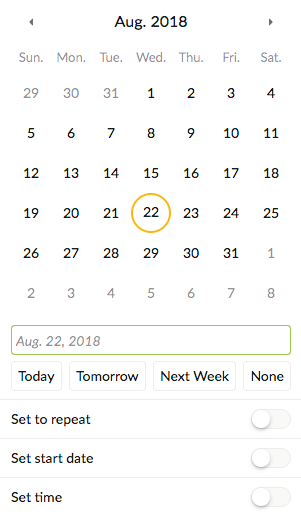
Crystal, Aug 22, 2018
⭐️ We have closed your thread in order to optimize the performance of the Quire Feedback Forum. Please see our Quire Feedback Official Guideline for more information.
Peggy, Apr 22, 2021
Hey @jacquie-94 , if you're interested, here's what I've done to work around this problem:
I use the start and end dates as indicated in my post above, and then I use priority to identify tasks that I'm going to do today. So my workflow looks something like this:
- Create tasks with a
startand/orenddate - View all tasks that are currently eligible to be worked on (based on
startandenddate) by using theSort by datefilter - Go through the list of tasks that appear in
OverdueandToday, and for tasks that you want to tackle today, change the priority toHigh - Create and save a custom filter named "Today's Priorities" (or whatever you want to call it) that sorts by date and filters for a priority of
HighorUrgent - You can now view your list of tasks to focus on today
The obvious downside to this is that you have to do this every day and you can't schedule a task to be worked on in the future. Some might argue that's actually a good thing; I'll let you decide. However, I still would love to see Quire incorporate a Scheduled date in addition to the Start and End dates. And if any of the Quire developers read this, being able to set multiple and repeating Schedule dates would be awesome.
I hope this helps.
Wayne Villars, Feb 7, 2019
Hi Jacquie, Sounds like what you want is to be able to change the start and/or due date in My Tasks directly. Let us consider it. As for the date format, you can go to your Account Settings and change the location to eg., English (UK) for it to be dd/mm/yyyy.
Crystal, Aug 23, 2018
Hi @michelle-28
Exactly what @waynevillars says. 👍
Jacquie Mitchell, Feb 7, 2019
Hi @waynevillars ,
thanks for the tip. We already use the priority function to keep tasks prioritized. Our work around is Projects are the task Tasks are a list of clients for that task These are the Main tasks, they recur & have a start & due date I have a set of template projects, when I need to schedule the work for each, I duplicate the template project for each client with the start date as the scheduled date and the due date. This project is not recurring I update the main project with progress updates Seems to work for us
Jacquie Mitchell, Mar 8, 2019
Hi Crystal,
Firstly have the preference to select in the MY Task List if the tasks are shown by the start date instead of the due date. Some of my Tasks start up to 2 months before they are due.
Secondly, The start & due date dictates when that task can commence & needs to be completed. Changing either of these dates, will change the regeneration dates, so to be able to schedule the task somewhere within that date range, say for next week because there is a delay, without interfering with the start date or the due date would be the aim.
Thirdly didn't mention before, but is there somewhere to change the date format to DD/MM/YYYY
Must say I do love Quire 😃 regards
Jacquie
Jacquie Mitchell, Aug 23, 2018