
When you search for tasks it should still show the parent tasks so that you see the context of what the task was about. Check how Workflowy does this 😃
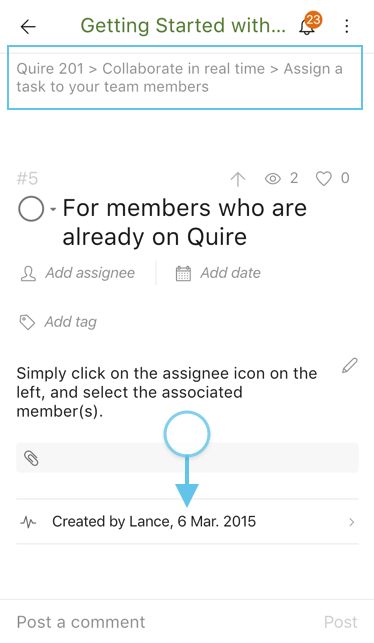
Hi Andy, Great. And FYI, you can see the “breadcrumbs” after rotating to landscape mode in the mobile app. 😃
Crystal, Oct 11, 2018
I think it is possible to also pull down on an Android task to see the parent task at the top
Andy, Jun 26, 2019
Ah yes, I knew that and had forgotten. Thanks
Andy, Oct 12, 2018
Hi guys, When you sort/filter, you can press Ctrl (or Alt for Mac) to see the “breadcrumbs” (hierarchy) of tasks. It should help. 😃
Crystal, Oct 9, 2018
Yea, i still get comments on subtasks like "What is this task for???".
I respond, "Look at the Parent task."
"How do i find the parent task?"
"Doesn't matter. Let me just rename the task so it is more obvious :-)"
Andy, Oct 9, 2018
Yes, that is useful. I should remind them of that. Good tip. Sometimes they are using the Android client so not so easy there. I appreciate there is only so much screen realestate in the app.
Andy, Oct 10, 2018
Hi Валерий, if the tasks in the same hierarchy are still in the same group after sorting or filtering, they will remain in the hierarchy. If not, toggling on breadcrumbs (hitting Ctrl or Alt on Mac) is the way to know which parent task it belongs to.
Peggy, Jun 25, 2019
+1 to show task hierarhy when use filters, because it's more easy to understand context and differences for matching tasks, than analyse breadcrumbs for every subtask.
Валерий Игоревич, Jun 25, 2019
⭐️ We have closed your thread in order to optimize the performance of the Quire Feedback Forum. Please see our Quire Feedback Official Guideline for more information.
If the request/feedback wasn’t answered or the issue hasn’t been resolved in the newest version, please leave a comment below, the Quire team will be notified.
Peggy, Jul 16, 2021
Yes, that's right!
Peggy, Jun 26, 2019
+1
Harley Cascante, Oct 9, 2018