
(note: related to comments on #{Getting_Started_with_Quire/41} View all my tasks)
In trying to get tasks to show in the 'My Tasks' section based on their start date (e.g., a task due in a month but with a start date of tomorrow should show under Tomorrow) , I realised that tasks with only a start date (i.e. no due date) do show like this. But when I went to add some repeated tasks with only start dates I discovered you cannot have a start-date-only task that is repeated! In order to have a task repeatable, you have to set a due date.
Can we please have tasks able to repeat without a due date?
Hey @waynevillars. Thanks for the suggestions. That first suggestion of repeating tasks with a current start date and a due date = one day prior to the recurrent period is great. I thought of this a few days ago and promptly forgot it! It's a pretty good solution and I'll give it a go.
For your second solution, it took me a little while to get my head around what you said, but I've got it now (ignore prior versions of this comment - I've edited out my misunderstanding 😂). That should work pretty well.
At this point I reckon I better start keeping an Evernote file on all my workarounds. Cheers for the solutions! 🙌
Andrew, Feb 2, 2019
Hey @AndrewSullivan , as you can see from the comments above, I have the same use case as you. If it helps at all, here's how I've used Quire to accomplish what you're talking about. It's not perfect, but it meets most of my needs.
Let's use your example of checking insurance rates every year on February 1st. Create the task, and set the start date to Feb 1st. Then set the due date to Jan 31st next year. Then set it to repeat Yearly. In this way, it will show up in My Tasks under Today every day until you do it, then it will set itself up for the next year.
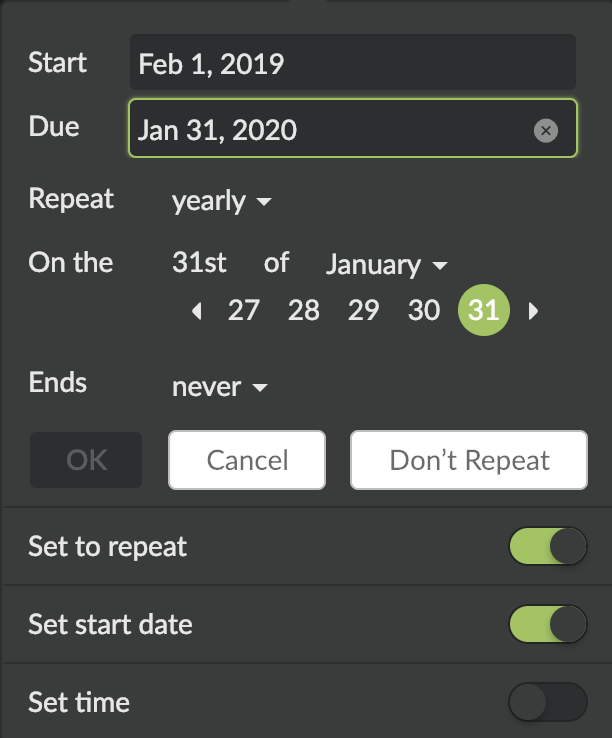
This example is a little easier because you have a specific start day each year. It gets a little more interesting/complicated if the repeat dates are based on when you completed the last one. For that, let's use your example of checking your tire pressuer every 2 months. I'm assuming that you don't want to check your tire pressure every 2 calendar months, and that you would prefer to be reminded to check your tire pressure approximately 2 months after you checked it the last time.
Create the task, and set the start day to Feb 1st and the due date to Mar 31st. Set the Repeat interval to Custom, and (here's where it gets a little tricky) set the number of days to 120 days (double interval you want to be reminded). Then check Since my last completed day. This will put the task in My Tasks under Today (and not Overdue). Once you complete it (let's assume you complete it on Mar 1st), Quire will create the next iteration and make it due 120 days out, so approximately July 1st, with a start date ~60 days before that, which is ~May 1st, which is ~2 months from the day you completed it.
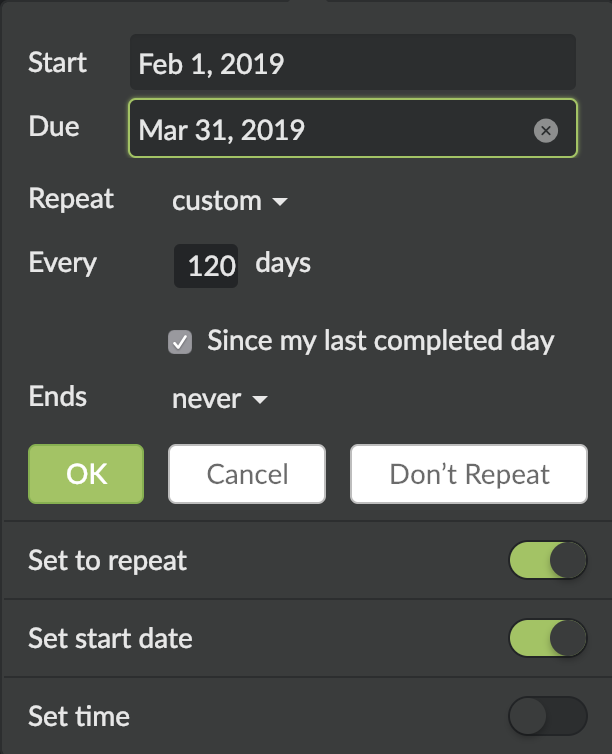
I realize it's not a perfect solution, but hopefully it gets you off the ground.
Wayne Villars, Feb 1, 2019
Hi. After not using Quire much over the summer break, I'm back into getting everything in my life organised through Quire. I've just re-discovered this issue and really think it is quite important that you permit tasks with repeatable start dates (and potentially no due date). I have a lot of tasks that are reminders to act but which have no due date, for example:
- Check insurance costs - start on 1 Feb each year, no due date: I want a reminder to do this each year, but it's not due on any particular date.
- Check car tire pressure - start every 2 months, no due date. Same thing.
So, I know I'm just repeating myself, but this really would be an excellent function. Love Quire, and just want to get everything into it! 😃
Andrew, Jan 30, 2019
Hi Andrew, thank you for the detailed feedback. For e.g. if you have a task with a start date of Nov. 14th and a due date of Nov. 20th, then you shall see it under Today in My Tasks in the future. When this is available, you should be able to 1) repeat a task with start and due dates AND 2) see it under Today, Tomorrow, etc., in My Tasks.
Michelle, Nov 15, 2018
Hi @peggy. Per the original feedback, this feedback is related to comments on #{Getting_Started_with_Quire/41} View all my tasks. The reason this is important is that your solution doesn't work because the My Tasks section is ordered with a due-date priority. If I use your solution of a recurring annual due-dated task with a due date set a year from now, it will sit in LATER in My Tasks for 11 months and only in the last few weeks will it escalate to my attention for action. Alternately, if I give it an annually recurring due-date for tomorrow, it will sit in the OVERDUE section of My Tasks and I can either continually change its due date or I just have to get it done straight away (when it's obviously not a priority).
The solution is therefore to provide for recurrent tasks that can be based on the due date, or the start date. I acknowledge this might not be a priority, but it isn't possible to solve it with the solution you've provided.
As mentioned in my comment to @michelle-28, I think it might be a difference in task management philosophy/approach. Some systems, like Getting Things Done/GTD and Omnifocus use start/tickler dates to help the user to know when take action. In order for Quire to compete with these quite-common systems and to have users transfer from other apps/software, it will have to figure out how to let start-and-due-date practitioners use this methodology with Quire. Currently, Quire only partially accommodates this approach. Hope this doesn't feel too critical: I think Quire is the best product I've ever seen in this space, and I just want to use it as fully as I can! I appreciate all the team's hard work!
Andrew, Feb 1, 2019
To give a scenario, I want to ensure that I keep in contact with friends and family and I have tasks to help with this. Let's say I want to contact Bob at least once every 3 months. It doesn't really matter when in that 3-month period I contact Bob, but I don't want to be longer than 3 months (e.g., without tracking this task, I might let it go a year or two until I remember to contact Bob)
If My Tasks organised by start dates as well as due dates (per comments on #{Getting_Started_with_Quire/41} View all my tasks), then this wouldn't be an issue. Because it doesn't, these are my options:
- If I have a task set up with a due date of 15 Feb 2019, I don't see this task in My Tasks until the end of the 3-month period, and then it starts getting "urgent" (i.e., it's going to be categorised as Overdue if I don't get it done shortly). This is obviously not ideal.
- Since tasks with only start dates do show in the My Tasks section, I could set this with today as the start date and no due date (which makes sense: there is no real/hard due date to this task - no-one really cares if it's completed on 15 Feb or on 20 Feb). But I can't make this task repeatable without a due date, so to make this work I would have to make a whole bunch of individual tasks with start dates staggered by 3 months (2019 Q1, 2019 Q2 etc.).
I hope that makes sense.
I think this highlights a really important thing Quire should provide for: some people use start dates/tickler dates (GTD)/defer dates (Omnifocus) as a way of organising tasks and time. I really want to use Quire with start dates as fundamental: using My Tasks as a way of seeing not only what I have to work on (by a due date) but what I want to work on, and using repeatable start-date tasks to ensure I don't lose sight of the things I want to get done regularly (rather than only things I must get done, or making faux due dates to trick the system into treating the wanted tasks like needed tasks).
Andrew, Nov 15, 2018
So far, where I've really missed being able to repeat tasks with just a start day, is when I set a task to repeat at a custom interval with Since my last completed day checked.
In the example below, Jan 17th isn't actually the due date. My insurance requires that I wait a full 180 days between teeth cleanings. However, it's not due on the 180th day. That just when I'm eligible to do it again. So I want that to be the start date. There really isn't a due date for this task. So I would like to be able to set a start date, then have it repeat with a start date that is 180 days out from when I completed it the last time.
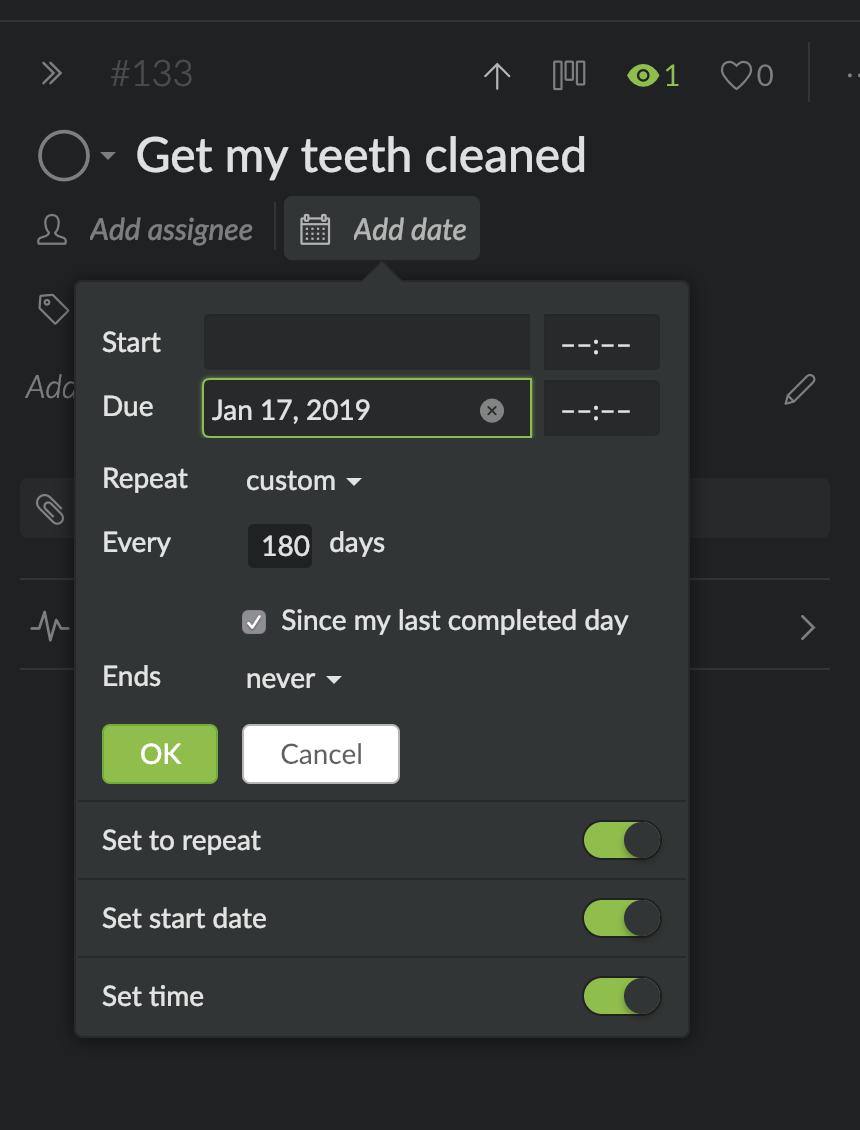
Wayne Villars, Dec 31, 2018
⭐️ We have closed your thread in order to optimize the performance of the Quire Feedback Forum. Please see our Quire Feedback Official Guideline for more information.
If the request/feedback wasn’t answered, please leave a comment below, the Quire team will be notified. Thank you.
Peggy, Jun 25, 2021
Hi, Andrew, Thanks and welcome back! 😃 For your case, I suggest you just only choose ‘Set to repeat’ (unselect the ‘Set the start date’). Treat the date you are entering at the top as the start date and set it to never ending, since there’s no due date for this task. For example: Checking insurance cost, you can set it like below. Hope this helps. 😃
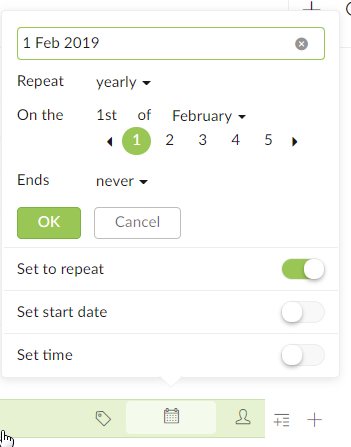
Peggy, Jan 31, 2019
@waynevillars Works great! I have a use case of making sure I've ordered sunglasses each year (weird Australian thing where you pay health insurance and you get "free" sunglasses each calendar year; forget to claim that year and you miss out). So I've set this as start = 1 July, due = 1 Dec, repeat 365 days, which results in My Task categorisations of:
1 Jan to 30 June: Later 1 July to 31 Nov: Today 1 Dec to 31 Dec: Overdue
Works a treat! Thanks so much!
Andrew, Feb 2, 2019
@AndrewSullivan , glad I could help 🙂. And that is weird... but cool at the same time, lol.
Wayne Villars, Feb 2, 2019
Hi Wayne, it makes sense! We shall discuss it with our team.
Michelle, Jan 2, 2019
Awesome, that sounds great. Thanks!
Andrew, Nov 16, 2018