
Here are screenshots that illustrate the problem: https://imgur.com/a/9EI0Rzu (one from 'Board', one from the same task in 'Tasks').
Earlier, the text "Upper Bound Experiment" showed in small text just above the title of the task in the Board tab. But now that is no more the case. I really like it. How can I get it back? (I want to see the context of tasks in 'Board' tab.
This helped in Web UI. But what about android?
Nikolay Ugarov, 2019年1月20日
Hi @peggy , No. I mean details view on web has breadcrumbs but on mobile it doesn't (phone in landscape)
Nikolay Ugarov, 2019年2月26日
Hi Nikolay, Yes, we do have breadcrumbs on mobile app. Just use landscape mode, then it will turn up as small gray texts above task names. For “My Task”, it will only show the project names. For details view on Android, do you mean you would like an detail panel half shown while in the task list view?
Peggy, 2019年1月22日
found the way to do it on android - rotate the phone to landscape, rather unobvious. IMO a setting would be much more helpull.
Nikolay Ugarov, 2019年1月20日
Hi Erlend, you can press the "Ctrl" or "Alt" for Mac to see the breadcrumbs (aka the parent task, root tasks). Let me know if this helps!
Michelle, 2018年12月10日
⭐️ We have closed your thread in order to optimize the performance of the Quire Feedback Forum. Please see our Quire Feedback Official Guideline for more information.
If the request/feedback wasn’t answered or the issue hasn’t been resolved in the newest version, please leave a comment below, the Quire team will be notified.
Peggy, 2021年6月25日
Hi NIkolay, you could just pull down in detail view on mobile, and the root tasks will show up, like below:
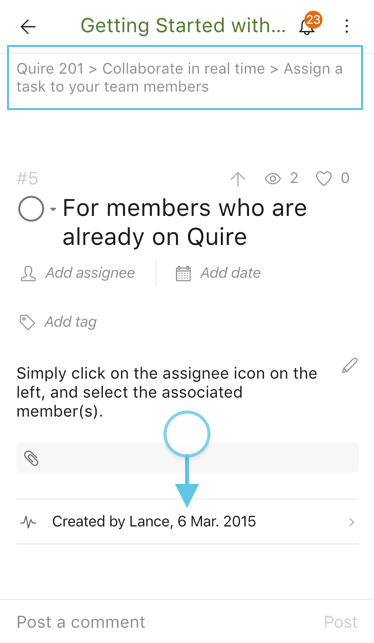
Peggy, 2019年2月26日
Still misinng breadcrumbs in:
Nikolay Ugarov, 2019年1月20日