
After pressing Ctrl, or selecting the task with tags, the tags are shown.
Maybe it's a feature. For me it would be useful to see tags right away when changing to other project.
Chrome
Thanks
⭐️ We have closed your thread in order to optimize the performance of the Quire Feedback Forum. Please see our Quire Feedback Official Guideline for more information.
If the request/feedback wasn’t answered, please leave a comment below, the Quire team will be notified. Thank you.
Peggy, Jun 24, 2021
Hi Miklos, unfortunately, we are unable to reproduce the scenario. When we switch to another project, the tags of that project did show in the task list. Could you provide a screenshot of what you see? It could help us look into the matter. Thanks!
Michelle, Dec 20, 2018
Hi Michelle,
You are right, if the middle panel is wider then the tags are shown without having to push Ctrl.
Do you think it's possible to make tags visible on smaller panels too without having to push Ctrl? I think space shouldn't be an issue, since after pushing ctrl it works normal.
This is how I use Quire: left panel pinned, always showing MY TASKS. I'm jumping around in different projects by selecting tasks from MY TASKS. The details panel is wide and pinned, so I can see task details right away. This make my middle panel no so wide. But it would help me a lot to put the task in context if I could see tags of parent/child tasks.
Miklos Bartfai, Dec 21, 2018
Hi Miklos, We shall show as many tags as possible and their full names in the future. It should help. 😃
Michelle, Dec 25, 2018
Hi Miklos, you can try to adjust the width of the middle main panel (aka make it wider). Let me know if this helps!
Michelle, Dec 21, 2018
Step 1: task with tag and sub task, task selected: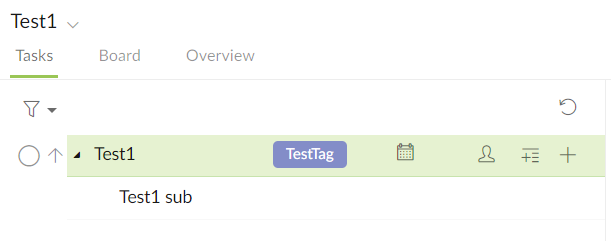
Step 2: sub task selected -> task tag disappears: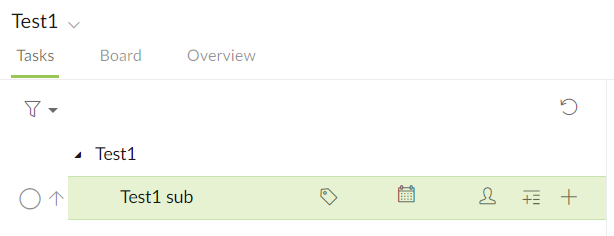
(Step 3: selecting task -> tag is visible again) (Step 4: selecting sub task -> tag disappears)
Step 5: press Ctrl -> tag is visible, doesn't matter what is selected. This is normal behavior for me.
Step 6: Go to other project, than come back -> you are at step 1 again.
Miklos Bartfai, Dec 20, 2018