
Hello, it seems not possible to delete Tasks from a board and NOT delete those from the project at the same time.. as one can selectively add tasks from a project to a board and not select others from the same project, it might make sense to delete tasks just from the board to avoid clutter if you happened to have added too many tasks to a board.. thank you and greetings
Thank you for the answer, this is clear now, My confusion came from the first import into the Board view - in this case you can add some specific tasks, so I though the "Board" would be an extra feature in the task database set which you can select or deselect.
Karl Petermichl, Jan 7, 2019
Hi Karl,
Our board view is basically a minimum view (subset) of the to-do list of a project. And the task view is the complete/full-set list. Which means, any task created or deleted from board, will also be added or taken away from that project in task view. And not vice versa.
Michelle, Jan 7, 2019
In case you have too many tasks in Board view, you can "remove" these tasks from this board instead of "deleting" them.
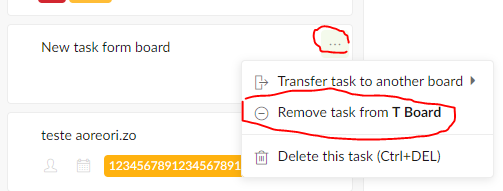
Jim, Jan 8, 2019
Thanks Jim, this sounds great!!! Yes this is exactly what I was looking for... I did not find it in the first place, as I just used the Options when I right-clicked on a Task in a Board, which is different to the Options list when I click on the elipsis... Thanks again!
Karl Petermichl, Jan 8, 2019