
Nesting task is very helpful, just one thing I think is miss. It will be great if the parent of current task is visible so we now where the task related.
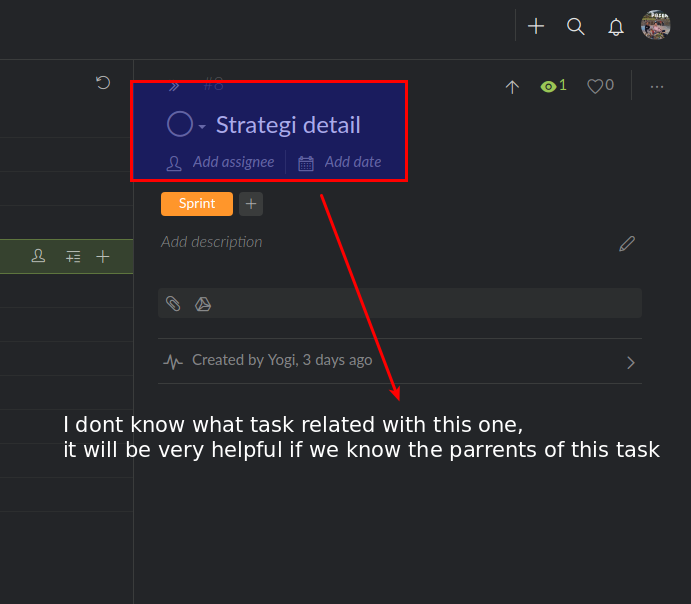
agreed would be a great help
(deleted-M61r), Jan 22, 2019
A quick note from another Ubuntu 18.04 user:
I had a similar issue as a result of having the option "Pointer Location" toggled on in a program called GNOME Tweaks.
The setting overrides the ability to have CTRL function within the browser for webpage shortcuts. When I turned it off, I could use CTRL again to toggle #ID's.
no_char, Jan 24, 2019
wow.. thank you no_char, it solved my problem. All is done, yes it's conflict with gnome tweaks for pointer location.
Yogi, Jan 24, 2019
Hi Yogi, Would you mind telling me which browser you are using on your Linux? Google chrome or Firefox? FYI, our team tested Chrome and Firefox with ubuntu-18.04.1, Ctrl key worked fine for both browsers. Also try pressing Alt, and see if it works or what will happen? Thanks! 😃
Peggy, Jan 23, 2019
I try it but nothing happen, I used linux. Where I should press the ctrl? I already highlight the task and press ctrl but nothing changed.
:/
The one who work is zoom button z but its take me to another page isntead of current window.
Yogi, Jan 23, 2019
Hi Yogi, Press Ctrl (or Alt for Mac), then it you will show you all the breadcrumbs (aka names of the parent tasks). To hide the breadcrumbs, just press Ctrl again - like toggling it on and off. Let me know if this helps. You can see more detail information here: #{Getting_Started_with_Quire/118} Show task IDs par...
Peggy, Jan 22, 2019