
Dear team! I think this is reasonable suggestion: Details view have no shortage of screen space, so why won't it show the "breadcrumbs" (i.e. parent navigation) regardless of "ctrl" switich (web) or phone orientation (mobile)?
BTW details view on mobile don't have breadcrumbs at all - looks like something to fix.
Nikolay Ugarov, Feb 26, 2019
This doesn't appear to be the case today. Is there an updated way to get the breadcrumbs to show? I'm on Android.
Jonah, Nov 18, 2025
Hi,
In the Account Settings, you can toggle on the option to Display tasks breadcrumbs in detail panel by default to always show the breadcrumbs.
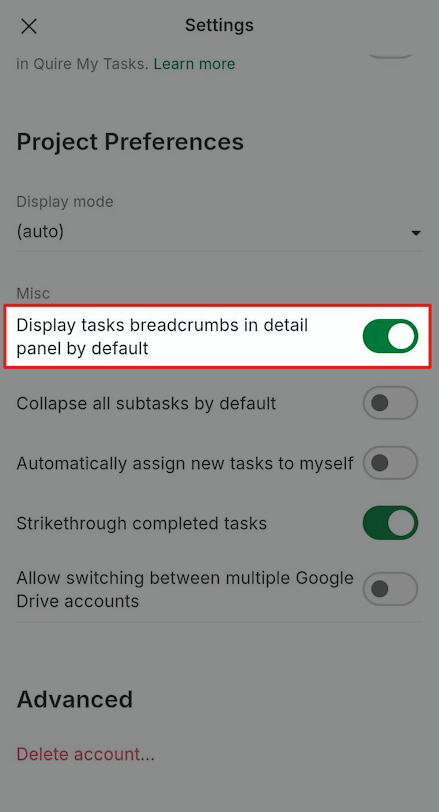
Golda, Nov 18, 2025
⭐️ We have closed your thread in order to optimize the performance of the Quire Feedback Forum. Please see our Quire Feedback Official Guideline for more information.
If the request/feedback wasn’t answered or the issue hasn’t been resolved in the newest version, please leave a comment below, the Quire team will be notified.
Peggy, Jun 25, 2021
Hi Nikolay, Thanks for this suggestion. We try to make Quire’s interface as clean and simple as possible, that’s why hide the breadcrumbs as our default. At the same time, we want to leave options for our users, so when pressing Ctrl, you could be able to toggle on/off the breadcrumbs.
For Mobile, you could pull down in the detail view, then you will be able to see the root tasks, like so in below screenshot. Hope this helps.
Peggy, Feb 26, 2019