
Though this is still true, I've discovered that, like others, the Smart Folder solves the problem. I can see all tasks across multiple projects and sort/view them the way I want. BEAUTIFUL! Removing the 5-project limitation would be EVEN BETTER! (I'm a one-woman band and have a workaround, grouping projects by client.)
Michele, Mar 13, 2019
I do understand why users might prefer sorting by due date. For my workflow, however, since I use templates to create projects, I end up with several tasks with the same name, each under a different project. Any way you can give users choices on how to sort MY TASKS?
Michele, Mar 19, 2019
Hi Michelle,
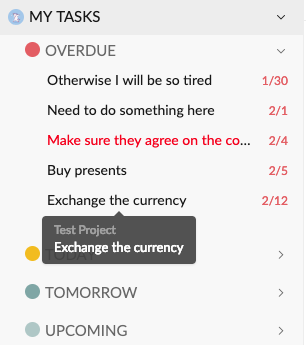
Lately we've made an adjustment regards to the sidebar, now you have to hover to the task to see the project that it belongs to. The reason why we did that is because there are a lot of users suggested us that the tasks on the sidebar should be sorted based on the due date, not based on the projects. After all, My Task section is for reminding you which task should be completed first 😃
Right now, since we're still in the beta version, we need to have the limitation on the Smart Folder. In the future, when our paid plan rolls out, users will have more options based on which plan they purchase. I hope you still enjoy Quire!
Vicky, Mar 13, 2019
Hi Michelle,
I understand your point! I'll let our team know about your feedback and we will think about how to implement in the future 😃 Thank you very much!
Vicky, Mar 19, 2019