
So I think this more about me not knowing how to use the recurring tasks feature, but when I complete a weekly recurring task, it is created again immediately, rather than in a week?
How should I be doing this?
Hi Peggy, the new Peekaboo feature would be one way of implementing this!
i.e. instead of building new logic to delay the creation of the next task, the new task could be set to auto Peekaboo upon creation. This should be much easier to implement 😃
Yozza, Jul 18, 2019
ahh! so just found the full quire documentation!
I had thought the "getting started" was just basic things, but it seems like it's very comprehensive documentation! Thanks!
Suggest maybe renaming this?
Potentially also suggest referencing this on the feedback project, I think it would help lots of users find the answers to their own questions?
Yozza, Mar 23, 2019
Hi Yozza, Thanks for the suggestion and mockup, I’ll bring this to our discussion! 😃
Peggy, Mar 26, 2019
Hi Yozza, I will make sure our team knows about your suggestions. Thank you. 👍
Peggy, Jul 19, 2019
But I guess on the substantive point re recurring tasks. From the documentation I see that this is the intended behavior?
My suggestion(/hope!) would be an option to set when the next task is created.
Once I've completed the task for that week/month/etc. I don't want to have to keep looking at it. I want it out of my mind!
Something like: "Create next task:"
e.g.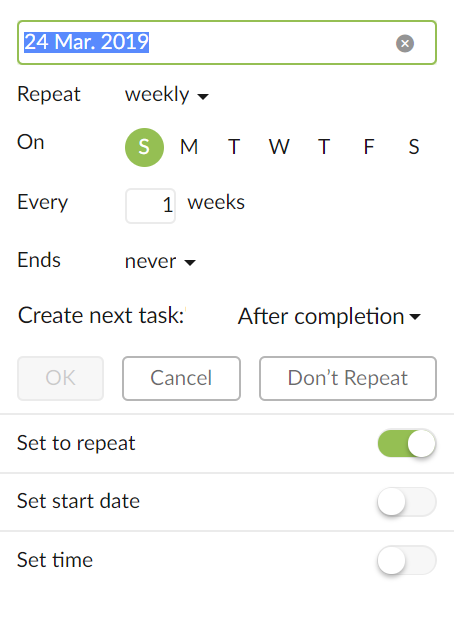
Options in the drop down could be:
Thoughts?
Yozza, Mar 23, 2019