
Tasks with short titles have a very small "edit task-title box" (the green box):

Tasks with longer titles have a larger "edit task-title box":

This makes editing the task title of shorter tasks much harder than for longer tasks.
It would be much simpler and easier if the "edit task-title box" filled the entire task line. e.g.:

Hi Peggy,
Yes, thanks, that makes sense.
However, I just tested this, and it looks like your implementation is actually much better than that! 👍 😃
Even if you click in the "edit task-title box" you can still drag and drop! i.e. clicking and holding anywhere on a task will allow drag and drop - even in the "edit task-title box":
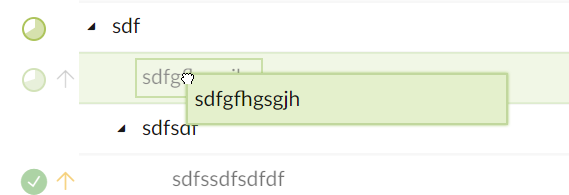
This is great because it means there is no disadvantage to dragging and dropping tasks with long task titles!
Given this, it seems that there would be no disadvantage to expanding the "edit task-title box" to fill the whole task line?
Thanks!
Yozza, Mar 30, 2019
Hi Yozza, It’s like a text editor, where you click on text, the cursor would be there precisely. If you click outside the box, it will inspect it allowing to drag and drop. If the box is too big, it won’t be easy for you to drag and drop since it will enter edit mode directly, hope this makes sense. Thanks. 😃
Peggy, Mar 29, 2019
Hi Peggy,
Yes, but that can be very inconvenient, especially when I want to choose a specific place to edit with my mouse...
That would require 1) clicking to select the task line, 2) pressing F2, and then finally 3) clicking again where I want to edit!
Thanks, fingers crossed!
Yozza, Apr 3, 2019
Hi Yozza, I suggest you could press F2 on keyboard to enter edit mode. Also we shall think about your suggestion, thanks.
Peggy, Apr 1, 2019