
In a board view, the name of the current board is displayed in full at the top, but when that drop-down list of boards is opened, or in the list of boards in the "Add to board" context menus, the board names are clipped to a fixed width. If two or more have the same beginning up to that width, there doesn't seem to be a way to see which one is which. Maybe there could be a tooltip to reveal the name of a board that is clipped. At the very least, the width of the list should take into consideration the width taken by the "three column" icon in front of each board name; currently if all board names are comparable in width, they all get clipped in the list because of the width of the icon.
Hi Thib, thanks for letting us know. Our tech team is looking into it, once it’s fixed, I will let you know!
Peggy, Apr 3, 2019
Hi @thibstanford , this issue had been fixed. Now, when you hover over the board name in the dropdown list, a bubble will pop up showing the full board name. Thanks.
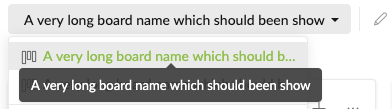
Peggy, May 7, 2019
Thank you!
Thib Guicherd-Callin, Apr 5, 2019