
Can we hide the tasks where the start date is in the future?
Via Quire Android
Hi all! Filtering by Date is available now. 🙌 You can now choose to see tasks that are within a specific date range.
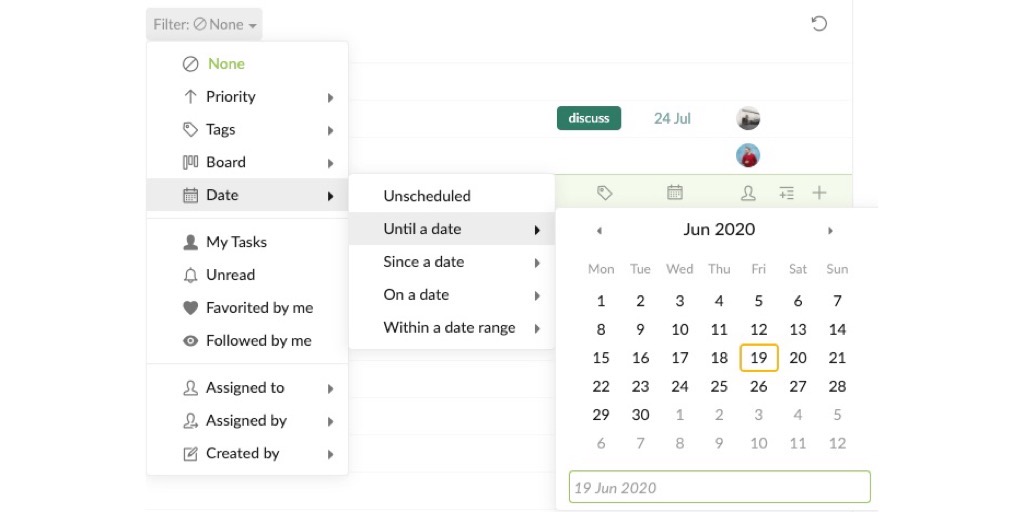
Peggy, Jun 19, 2020
This is exactly what we need, but to exclude due dates in the future.
Thinus Botha, Oct 22, 2019
Hi @peggy , regards for the new year! Just checking in if there is any news on this suggestion. I list looks very long if you see recurring task that will only happen again in 1 year from now.
Thinus Botha, Jan 30, 2020
Awesome. Thanks!
lu, Apr 26, 2019
I made a similar request elsewhere. It seems that by definition a task with a start date in the future is not "Active" and should be excluded this filtered view.
I see that you have just added the peekaboo feature, which I suppose is tangentially applicable. If you were able to use if to hid a task "until start date" that would perform a similar function albeit one that needed to be applied manually.
Really it seems that the solution is to address the basic problem which his that future start dates should either have their own filter category or at the least not be considered active.
~Asli Bulbul, Jul 8, 2019
Hi lu, noted, I will bring this to our team, thanks.
Peggy, Apr 26, 2019
Yeah, i agree, Thinus. Sometimes I'd like to "peekabo" a task to make it appear again on say 0800 on Monday, but i don't want to change its start or due dates. I use the snooze feature like this all the time. It's really handy and the mails which I'm not done with yet doesn't have to clutter the inbox up. I've considered sending a mail to myself sometimes with a task just to accomplish this.
Alright, Joshua. Glad I'm not the only one. Thanks.
Oscar Jonsson, Oct 20, 2019
Am i supposed to be be able to favorite this very task? If i click the heart icon it lights up and then the page immediately reloads, but then it isn't highlighted anymore.
Oscar Jonsson, Oct 19, 2019
Also, this is kind of irrelevant but why can't I favorite tasks in this list? If I remember correctly I think I was able to before?
Oscar Jonsson, Oct 5, 2019
Yes but that's inconvenient because I'd like to use the sorting feature for other purposes...
lu, Apr 25, 2019
Hi Thinus, you could Peekaboo a task, meaning you can hide the task and set it to reshow days after. Thank you.
Peggy, Jul 30, 2019
This is actually the one most important feature request for me. I have a lot of recurring tasks as well as single future tasks that can't be completed yet, and it just gets so cluttered having to see all of them among the tasks that need to be completed asap and it can even make me miss tasks that should be carried out asap that hide among all the future tasks.
Sorting by “Start per week” doesn't do it for me. I guess I could accept having to see the future tasks at the bottom like that, but the problem is that it hides all the tasks that don't have start dates. I could get in the kind of annoying habit of always adding a start-date of today for al tasks that need to be completed asap, but just forgetting it for one task might make me completely forget about it and leave it unfinished.
The peekaboo feature wasn't unwelcome for me at least I guess, but as far as I can see a specific date can't be set, and I wish it was integrated with the starting date instead.
So yeah, this is the most important feature for me and have been for a long, long time.
Oscar Jonsson, Oct 5, 2019
Hi @ogggan , thank you for your suggestion, I will let our team know about it!
To favorite a task, right-click, click on Favorite in More. Or click on the Heart icon (upper right corner) in the detail panel. Hope this helps. 👍
Peggy, Oct 9, 2019
Hi @thinusbotha , sorry, we don't have updates for this request yet. We were busy developing other features and haven't gotten the chance to schedule this one into our to-do feature list. Please give us more time. Thank you.
Peggy, Feb 3, 2020
Hi lu, You won’t be able to hide it, but I suggest you could sort by “Start per week”, this way you could collapse the ones that start in the future to hide them.

Peggy, Apr 25, 2019
Hi @thinusbotha , I will pass this suggestion to the team. Thank you!
Peggy, Oct 22, 2019
Having to 'peekaboo' a task with a new date, after it already has a due date set sounds like a complex solution to a basic problem?
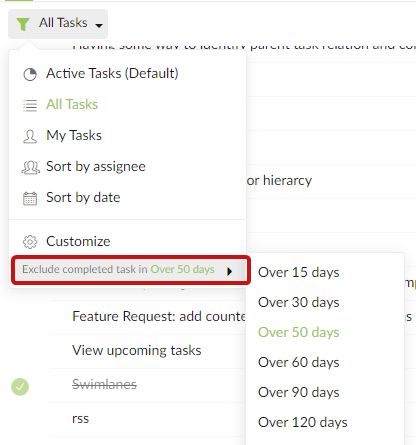
There is already a filter for 'done' tasks after x time, why not have same for future tasks?
Thinus Botha, Oct 20, 2019
Hiding future tasks will be very valuable. Sorting by due date also breaks the subtasks view.
Thinus Botha, Jul 28, 2019