
#1928: Quire Feedback
Status: Completed
It'll be great if you add a percent to task so we can inform about how its going the task and how much left to finish this.
Regards.
Created by Daniel Hidalgo May 10, 2019, Edited Oct 9, 2019
mmmm it's not there
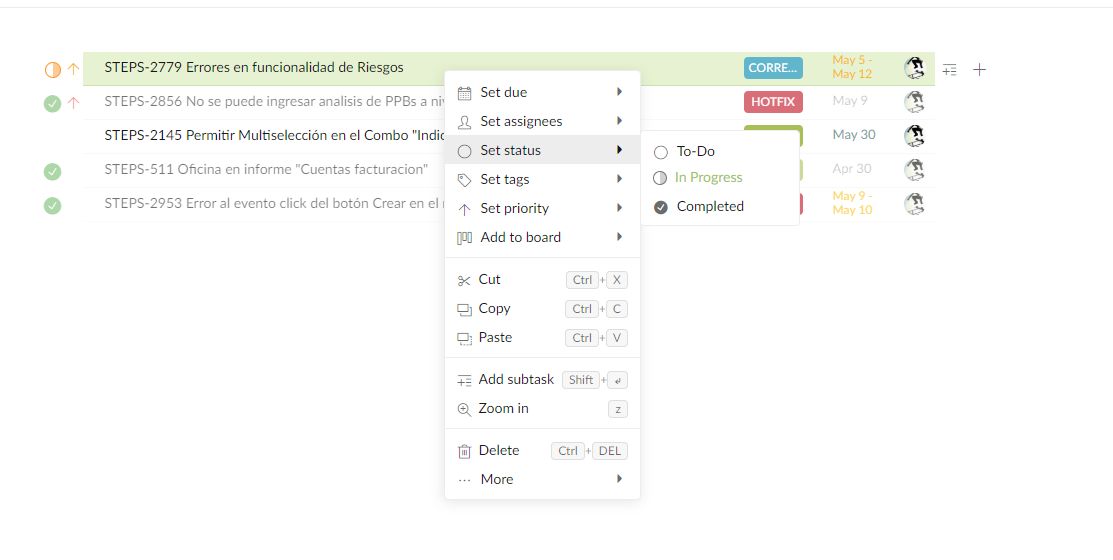
Daniel Hidalgo, May 11, 2019
Hi Daniel, right-click a task > set status > more, there will be a list of percentages for your to choose from. Hope this helps. 👍
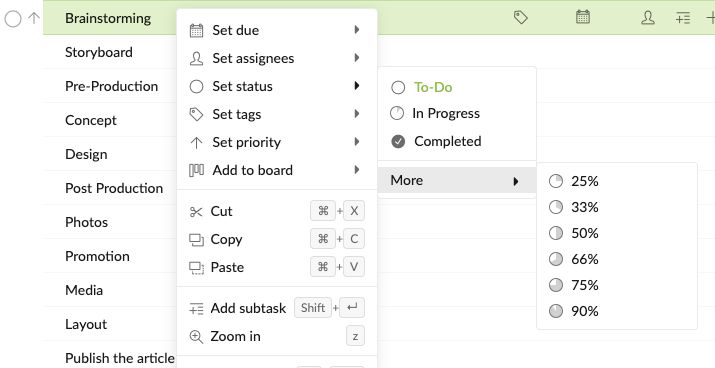
Peggy, May 10, 2019
Hi Daniel, if you have already added the task into a board, there won't be "More" for you to choose from. The statuses when you right-click will be the same as the statuses in your board. Take mine for example: because I have already added the task "Brainstorming" in a board, and I have created a new column called "Testing" in my board, that's why it will appear in my statuses when I right click on the task.
A quick tip: To see which tasks that are already added in a board, you could hit
Ctrl( orAlton Mac) for the breadcrumbs to show. Hope this helps. 😃Peggy, May 13, 2019