
Hi! I really enjoy using Quire as a way to organize my todo list. I noticed that the "+" shortcut to add a task has disappeared on my tasks UI. I do see it on the feedback list though. I would love to get it back - I was using it all the time.
A separate feedback I have is that it'd be helpful to flag an item in some way - when the task is blocked, for example.
Cheers!
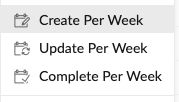
Hi Julie, I’m sorry, could you please be more specific? which + shortcut are you talking about? do you mean the + sign on the mobile app or the web browser? it would be super helpful if you could attach a screenshot! Note that in some sorted view, for example, when you sort by Create/ update/ complete per week, you won’t be able to add tasks.
Also, to flag an item, you could add a tag called “flag” or “blocked” to the tasks. Would this be enough? Or you don’t want to see the tasks after you flagged them? Thanks.
Peggy, May 23, 2019
@mabonzo it was the option key that triggered the on/off of the add task icons (on macbook). I must have been pressing the option key unintentionally, causing the icons to toggle.
Julie, May 24, 2019
⭐️ We have closed your thread in order to optimize the performance of the Quire Feedback Forum. Please see our Quire Feedback Official Guideline for more information.
If the request/feedback wasn’t answered or the issue hasn’t been resolved in the newest version, please leave a comment below, the Quire team will be notified.
Peggy, Jul 2, 2021
Hi @mabonzo , thanks for helping out and thank you for the suggestion. We allow users to filter by completed tasks, that's why there is only one “completed 100%” status. You could give your tasks different tags: “sent to department” and “missed deadline”, then filter by the tag name. Hope this helps. Also, I’m not quite sure what you mean by “tags don't organize or utilize the kanban”? Thanks! 👍
Peggy, May 27, 2019
Hi @julie-65 , I’m glad that you found the Ctrl (Alt) breadcrumb feature! As for the red attention icon feature, you could use the Favorite (heart) feature as a workaround. Thanks.
Peggy, May 27, 2019
personally I wish there was the option to have multiple "completed" aka 100% statuses for the status of completion. like 'complete' and 'sent to department' and 'missed deadline' etc so I can use the filter view to remove the completed tasks without needing to categorize tasks on multiple levels, because tags don't organize or utilize the kanban
mabonzo, May 24, 2019
Hi Peggy, happy to, thank you for asking. I am using the web browser.
This is what I'm seeing, note the "+" icon for adding a task is not there.

On the Quire Feedback list, I do see it:

I personally use the + a lot to add tasks, so I'd love to have it back.
Julie, May 24, 2019
As for flagged / blocked tasks, I imagine it to be an additional "status" along with To-Do, In Progress, and Completed so the team can easily see that a task needs attention without having to resort to the tags.
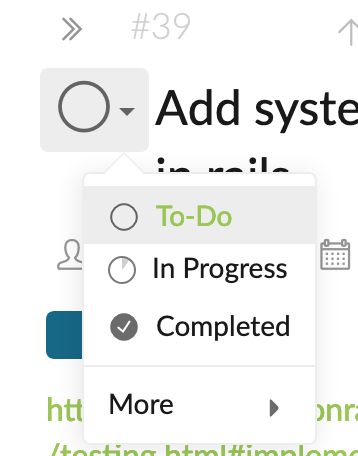
For example, it could be a red attention icon instead of the green or orange for completed and in-progress status.
Julie, May 24, 2019
Update: my beloved + icons are back!
Julie, May 24, 2019