
Because of my windows regional settings, I have semicolon as list separator, which make akward to import CSV on Excel. Yes I know 'comma separeted values' are supposed to be separeted by commas! but say that to microsoft! :-P hahhaha!
Now I'm working on windows 7 spanish (regional settings: Argentina)
Hi @robertocabellon, Thanks a lot! I see what you mean now. Perhaps one solution is to set comma (instead of semicolon) as list separator in your regional settings, so when you open an exported CSV file in Excel, it would display correctly. However, I'm not sure if this way would "get in the way" of your other files containing semicolons. That said, we will see if we could find a way to detect your regional settings and have semicolons as output. 😃
Crystal, Sep 5, 2016
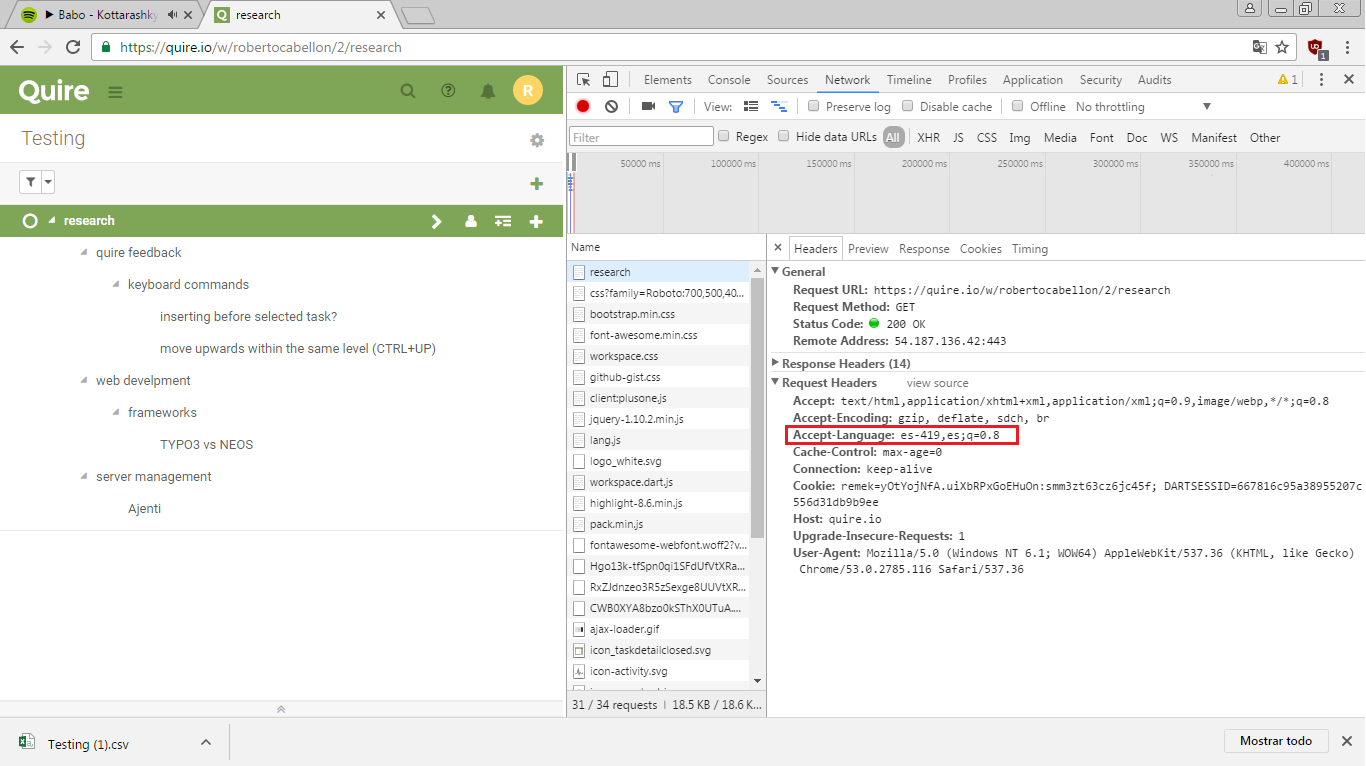
Hi Tom, In all cases navigator.languages[0] returned the same as navigator.language. On windows: works fine with firefox, but still fails with chrome... Please don't hesitate to ask any other information you need! 😃
RobertoCabellon, Sep 21, 2016
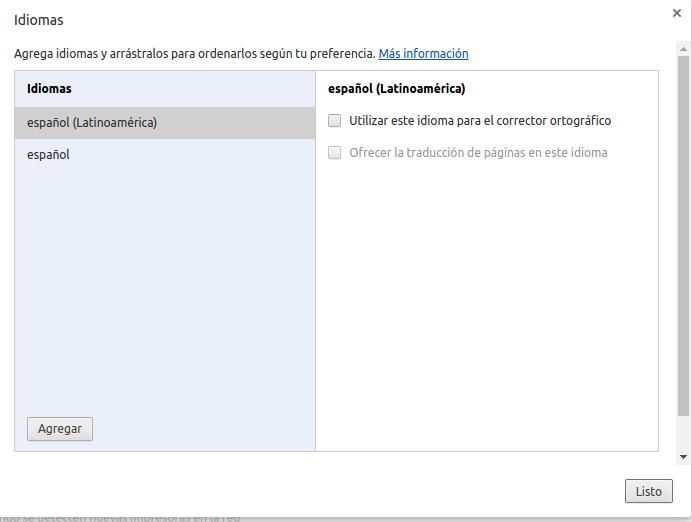
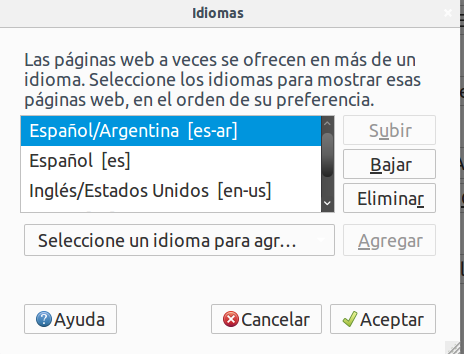
HI Tom! It only works on firefox on windows, and now I can say that also works on iexplorer. But chrome doesn't seems to be detected. On linux, doesn't works on any browser. I send you some screenshots as requested.
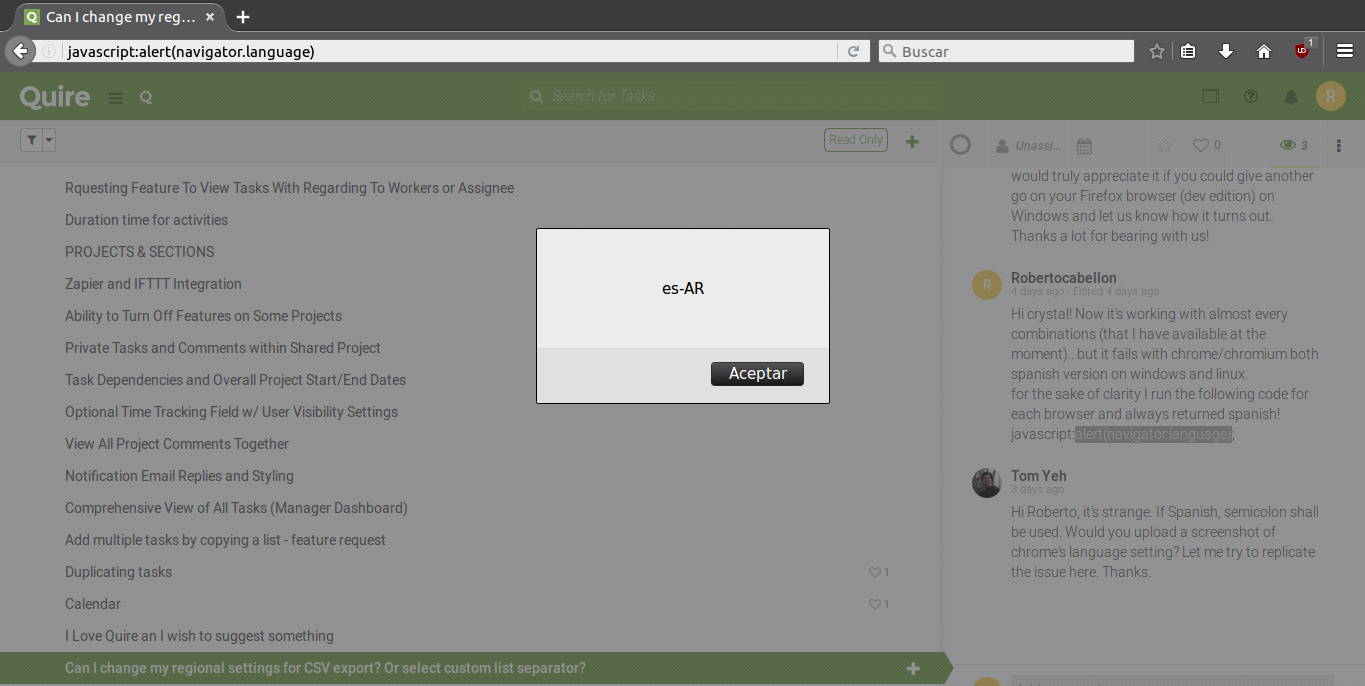
By the way, this time I also tryed running javascript:alert(navigator.language) on android browser's address bar and it also showed up "es-AR".. as in every other configuration browser/OS ;-)
What do you thing about the posibility of selecting this option as a custom setting from my profile, as I suggested in the beggining? Or is there any reason for you to want it to be automatically detected?
best regards!
RobertoCabellon, Sep 20, 2016
Hi @robertocabellon, We should have fixed the issue this time. We would truly appreciate it if you could give another go on your Firefox browser (dev edition) on Windows and let us know how it turns out. Thanks a lot for bearing with us!
Crystal, Sep 12, 2016
Hi crystal! Now it's working with almost every combinations (that I have available at the moment).. but it fails with chrome/chromium both spanish version on windows and linux. for the sake of clarity I run the following code for each browser and always returned spanish! javascript:alert(navigator.language);
RobertoCabellon, Sep 15, 2016
Great news! 👍 Thanks Tom for your patience! 😃
RobertoCabellon, Sep 22, 2016
Sorry! Still not working.. 😞 I've tried both with Spanish versions of Firefox (dev edition) on Windows 7 x64 and Linux Mint 18 x64. Fortunately I most commonly use Linux and Libreoffice Calc asks for which separator to use for parsing... and I didn't have problem with csv files! The problem is on windows, where Excel parses the format with the system default separator without asking.
RobertoCabellon, Sep 12, 2016
Hi @robertocabellon, Would you be kind enough to provide us with a screenshot? Seeing it visually would help us understand and solve the issue. Thanks!
Crystal, Aug 31, 2016
Sure! here are some screenshots with comments. Anyway the following document may help you to better understand what is going on. 😃 https://kb.paessler.com/en/topic/2293-i-have-trouble-opening-csv-files-with-microsoft-excel-is-there-a-quick-way-to-fix-this
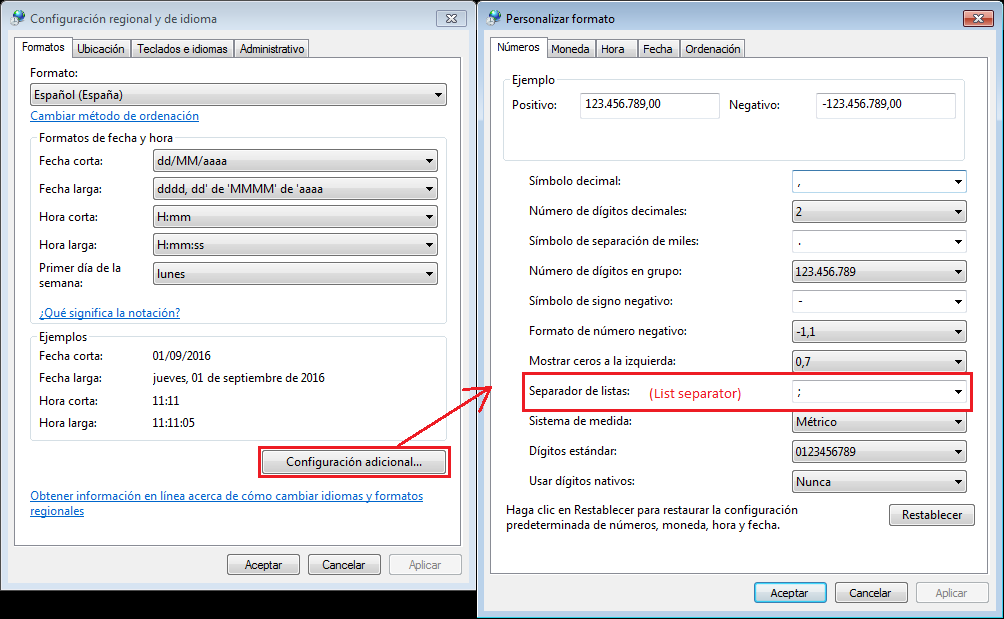
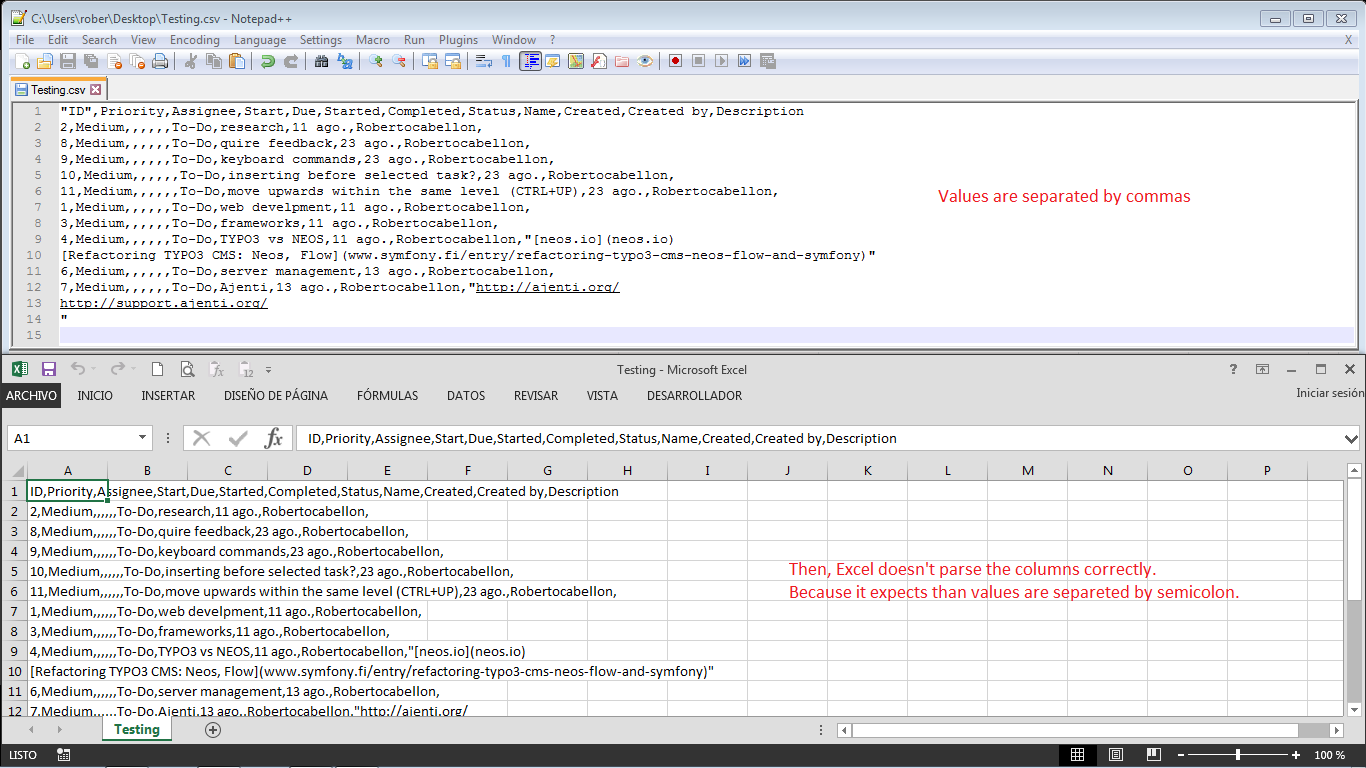
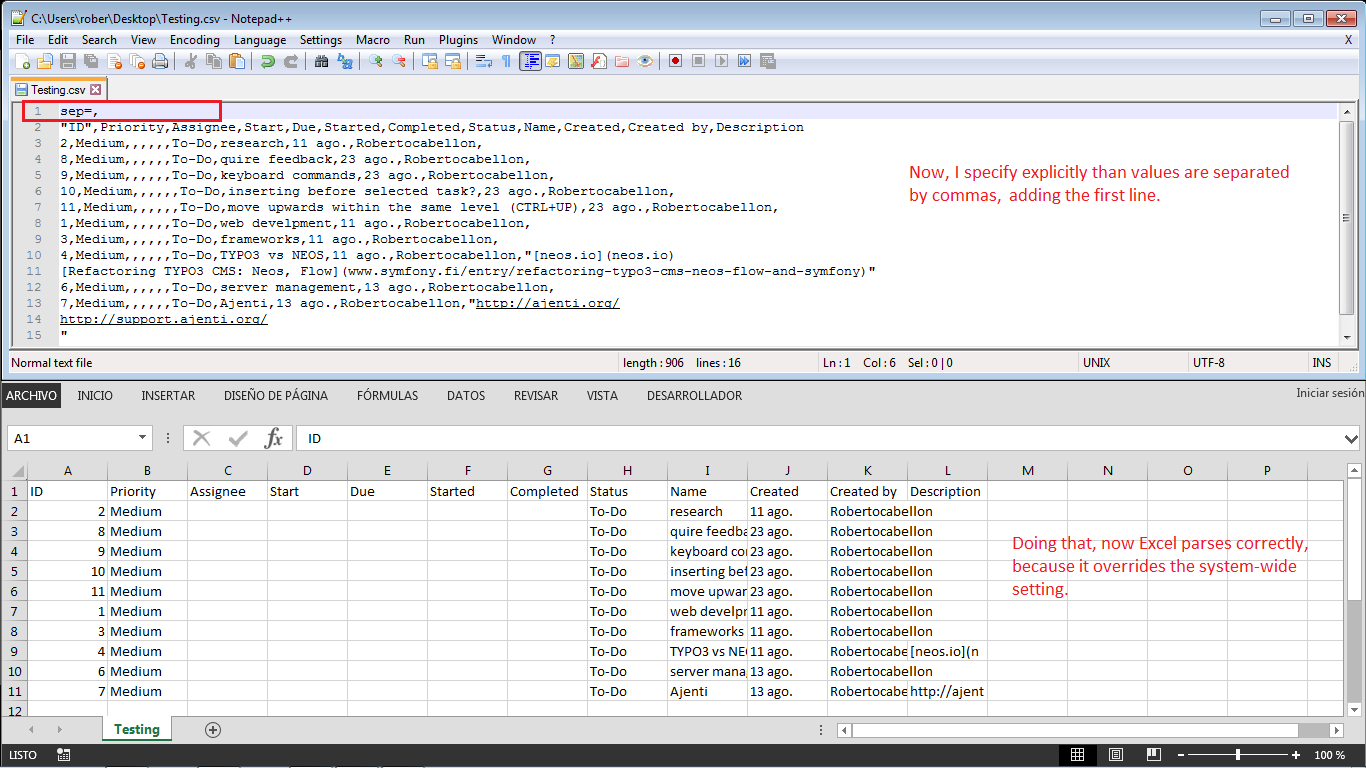
RobertoCabellon, Sep 1, 2016
Hi @robertocabellon, Sorry for the trouble. 😞 Please let us see if we could reproduce it. May I ask what is your browser's default language (not your Windows system's)? It would help us solve the issue. Thanks! Fyi, the way we decide on the separator is based on your browser’s default language.
Crystal, Sep 12, 2016
Hi Roberto, it's strange. If Spanish, semicolon shall be used. Would you upload a screenshot of chrome's language setting? Let me try to replicate the issue here. Thanks.
Tom Yeh, Sep 17, 2016
In es-419, the default decimal point is a dot (refer to this). It is why we use comma instead of semicolon.
To workaround it, please specify, say, es-AR for the first language.
Tom Yeh, Sep 21, 2016
Sure. We plan to have more control of Excel exporting, even including XLSX format (leveraging grouping for subtasks). But, it won't be on the horizon anytime soon.
Tom Yeh, Sep 22, 2016
No problem:)
Unfortunately, we made a mistake in the latest update -- we didn't handle es_AR well. It will be fixed in the next update (scheduled tomorrow). If you need it now, please specify es or es_ES instead. Sorry for the inconvenience.
Tom Yeh, Sep 22, 2016
That's ok! Thanks Tom! Sorry to be so persistent, but would you consider in the future the possibility to save this setting on my quire's user profile to avoid having to change browsers settings on each workstation.
Anyway you should mark this as solved! 😃
RobertoCabellon, Sep 22, 2016
Hi @robertocabellon, This issue has been fixed! We are now able to detect your regional settings and use semicolons if necessary. However, we do not have the environment to verify this. Please have a try and let us know if it works. Thanks! 😃
Crystal, Sep 6, 2016
We can only reproduce the first case: Spanish (Latin America). The language is actually es_419 which uses dot as the decimal point.
If
es_ARis specified, it works fine on Firefox, Chrome, or on Windows and Linux.BTW,
navigator.languageis not accurate. Could you usenavigator.languagesto double check? The server side uses the first language in the Accept-Language header which shall be the same asnavigator.languages.Tom Yeh, Sep 20, 2016