
Hi @nisargdesai , If both start and due date are past due, our system will remind you based on the due date. In this scenario, the setting “Remind Overdue Tasks” in your Account Settings will be based on the due date.
If you would like to be reminded per week, set the task to repeat weekly, and complete the task, then the system will create a new task with a new date.
Peggy, 2019年9月27日
I've seen this comment more than once now and I also struggled with this in the beginning .
I suggest making this the default behavior instead of having to dig and find it in settings.
I almost abandoned Quire because of this, until I found the hidden setting.
This should be the default behavior.
(deleted-OmuA), 2019年9月2日
@joshuarobison.biz thanks for guiding me about this. i thought it will keep notify me since start date till due date about this task. did reset due date hopefully i will get notification.
and I still like if quire team set this notification since start date and time trigger. instead of due.
Nisarg Desai, 2019年9月23日
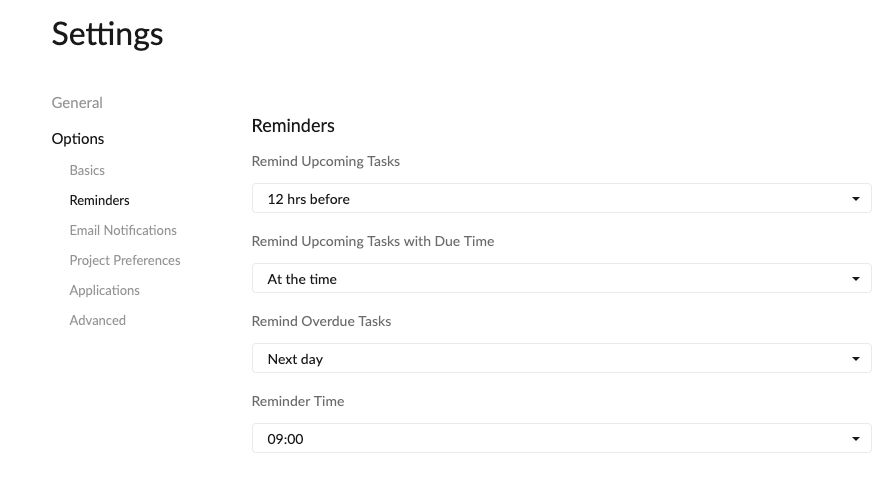
Hi Nisarg, please check if you have set time for a reminder for your upcoming tasks. Account Settings > Reminders > Remind Upcoming Tasks
Peggy, 2019年8月30日
@peggy what if start and due both are past date? will i still get notification as I already mention its recursive task. this task is very long process something like i need to publish 500 article on my site but it will not going to be done in one day. if i publish 10 per week than someday it will be 500 but i need to check weekly basis how much article published till now. so start and due is huge gap but i need recursive reminders between them on weekly basis.
Nisarg Desai, 2019年9月25日
Hi Peggy, NO i did not received any notification of my any of the task on due date i received email for task that has are not repetitive but repetitive task no email notification nor Mobile Notification. I am using OPPO A3s with Android 8.1.
@joshuarobison.biz absolutely after all this is an Project and Task Management App.
Nisarg Desai, 2019年9月3日
Its Been Filled
 But still not getting any Notification on mobile.
Nisarg Desai, 2019年8月30日
Hi @nisarg.desai , according to the settings you have provided, @joshuarobison.biz got it right, you won't get a notification until Dec 29th.
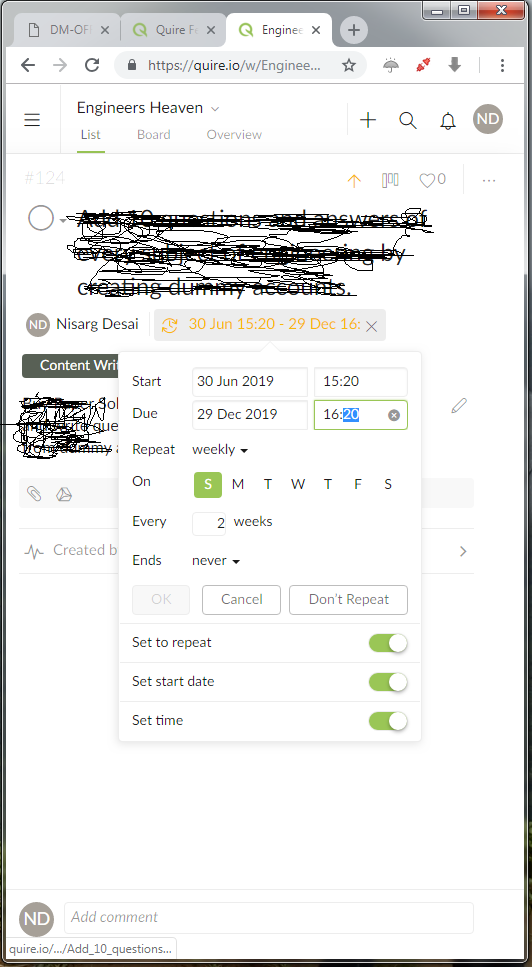
You have set Jun 30 as the task start date and due date as Dec 29.
If Jun 30 were in the future, our system would remind you based on the start day (Jun 30). In this scenario, the setting “Remind Upcoming Tasks” in your Account Settings will be based on the start date.
However, if Jun 30 already passed, our system would remind you based on the due date of the task (which in this case, is Dec 29). That's why you will not get a notification until Dec 29.
Simply put, if the start date is in the future, Quire system will remind you based on the start date. If the start date is already in the past, Quire system will remind you based on the due date.
(Sorry if this got a little bit long... 😱 )
Peggy, 2019年9月25日
@peggy did follow your instruction still no luck.
Nisarg Desai, 2019年9月11日
Hi Nisarg, hmmm... you haven't received any notifications? Or you only have received some notifications? 😱
Peggy, 2019年9月2日
Hi @nisargdesai , please tell us the start date and time, due date and time, and the repeating pattern that you have set to the task. The more detailed, the better. Screenshots could also help a lot. Thank you.
Peggy, 2019年9月12日
The Settings of Task as Per this image.
Nisarg Desai, 2019年9月23日
Hi Nasarg, Would you please clear the cache and data for Quire app > deleted Quire app > restart phone > reinstall Quire > finally check again. To clear the cache and data for Quire app, please go to Settings > Apps > Quire > Storage > Clear Data and Clear Cache. Please let me know if the issue still persists. Thank you.
Peggy, 2019年9月4日