
I undestand that Ctrl + / should mark the task as completed, but it doesn't work on my computer. The / hotkey works fine, but Ctrl + / doesn't work. In order to complete the task, I figured out (by trial and error) that I have to press Ctrl + ' . On my keyboard (Croatian language), the ' key is located in the numbers row, it's the first key to the right of 0. So it's 1,2,3,4,5,6,7,8,9,0, '
Anyway, maybe I'm wrong about keyboard layout being to fault for this, but that's my hunch, seeing how / hotkey does what it's supposed to, but Ctrl + / does nothing, while Ctrl + ' does what Ctrl + / was supposed to do.
Best regards, Ivan
The only thing these two keys (marked with "a" and "b" in my picture) have in common is this: In Croatian, typing Shift + [key marked with "a"] will write "?" In English, Shift + [key marked with "b"] will write "?" too. 😃
Ivan Cajic, Oct 18, 2019
I am normally using Croatian input, where I'm experiencing problems. Now, for testing purposes, I tried English input, and it works fine there.
Windows 7 Ultimate
If I switch to English, it works fine. I will elaborate and use a picture of the keyboard for easier explanation. If you take a look at the attached picture, when I set my laptop to English layout, the / key is located at the key which I marked with "b". The hotkey for completing tasks works correctly. The / key can also be found above the numpad, where I marked it with "c". Using the hotkey Ctrl + / in this case doesn't trigger any action. However, using just the / key (without Ctrl) correctly triggers the completion mini-menu.
On the other hand, when I use the Croatian layout, the only way to directly type / is by using the key above the numpad (marked with "c" in the picture). The other way to type / in Croatian, is to use Shift+7 (marked with "d" in the picture). So, in Croatian, it would be logical to assume one of these 2 options should work:
- use Ctrl + / (key above the numpad, marked with "c"), but it doesn't work.
- use Ctrl + Shift + 7 (key marked with "d"), but it doesn't work.
However, surprisingly, I have figured out that in Croatian, using Ctrl + ' (key I marked with "a") gets the job done. However, pressing just ' (without Ctrl) doesn't trigger the completion mini-menu. That's the confusing part :-)
I think some other people with non-english keyboard layouts might also experience problems.
BTW- Can you please make this hotkey work even when using the / above the numpad?
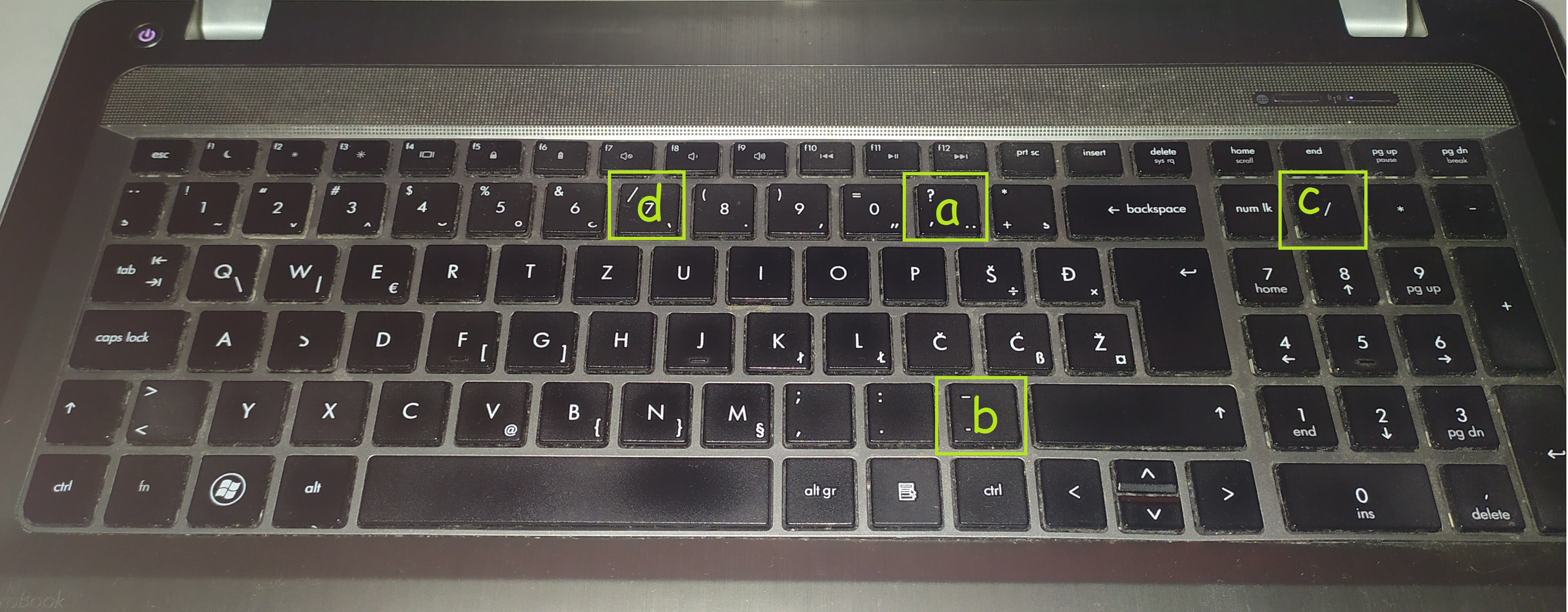
Ivan Cajic, Oct 18, 2019
Hi @ic , please see our questions below and kindly let us know the results, thank you in advance. 😃
- Are you using the Croatian input or English input? Is the
/located at the7key? - What OS are you using?
- Switch the input to English, and try
Ctrl+/, will it complete the task?
Peggy, Oct 17, 2019
Hi @ic , with the newest version update, we have supported Ctrl + / (on number keypad) in both Croatian and English input.
In short:
- in Croatian input, the keyboard shortcut for completing a task would be
Ctrl+/(on number keypad). - in English input, the same as above and also
Ctrl+/(marked with "b" in your screenshot).
Peggy, Oct 24, 2019
Thanks 😃
Ivan Cajic, Oct 24, 2019