
Por algún motivo desde la actualización a la nueva versión de "Mis tareas", estoy notando que cuando cambio la fecha de una tarea, Quire se congela durante unos 30 segundos.
He probado en los navegadores Chrome, Firefox y Biscuit, el resultado es el mismo (Firefox notifica "Esta página está ralentizando tu navegador" a lo poco de congelarse)
Hi Hector,
Could you please let us know if this issue happens on Chrome or Firefox? Thank you very much
Vicky, Dec 4, 2019
Thanks Hector! Our Dev team is looking into the issue right now! I'll keep you updated 😃
Vicky, Dec 3, 2019
Sure.
Only happens in web version (regardless of the browser); in the phone there is no lag at all.
Héctor Villa Fernández, Dec 2, 2019
Hi Vicky,
It happens both in Firefox, Firefox Night, Chrome and Biscuit Browser
Héctor Villa Fernández, Dec 4, 2019
Hi Hector,
Great to know 😃 Thank you very much.
Vicky, Dec 12, 2019
Thanks for the quick response Hector! We’re looking into the issue right now and I’ll keep you posted!
Vicky, Dec 4, 2019
Ok, thanks 👍
Héctor Villa Fernández, Dec 3, 2019
Hi Hector,
Could you please let me know if the lag happens on your mobile phone or on the web version? Thank you very much
Vicky, Dec 2, 2019
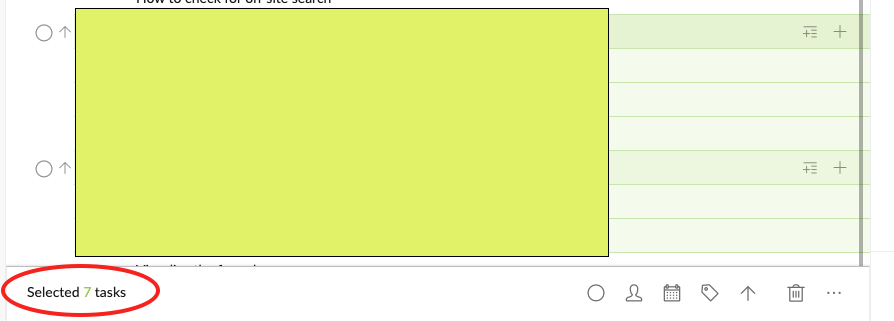
@hectorvfern - hit Ctrl+A to select all the tasks, then you will see the total task number at the bottom menu bar.
Peggy, Nov 28, 2019
Since today the lag doesn't happen anymore. I think you can close this post, it seems solved.
Héctor Villa Fernández, Dec 12, 2019
Vicky, Dec 2, 2019
How can I see the number of Tasks?
I tried both sorted, filtered and without any filter/sorting. The problem and "lag" is similar.
Héctor Villa Fernández, Nov 27, 2019
Hi @hectorvfern , thank you for your report. Would you mind providing us more details?
- How many tasks do you have in My Tasks?
- Did you sort My Tasks under any conditions (e.g. Sort by Date)?
Looking forward to your reply. Thank you in advance.
Peggy, Nov 21, 2019
Ok, I had to unpin the lateral sidebar to see the number.
It shows that there are 810 tasks in "My Tasks"
I noticed recently that the lag increases the farther the due date is (for example, it lags around 30 seconds if I put it for the next week, and a few minutes if I schedule it for the next month)
Héctor Villa Fernández, Dec 2, 2019