
Hi, Is there an option to hide projects from my side panel? Since I'm an admin in Organization I see all projects, which are created by other people and I want to reduce number of projects that I see. Is it possible to do?
@eugene.shatilo , duly noted. 👍 Thanks.
Peggy, Nov 27, 2019
Why not do a filter by either:
① Assigned to: you ② Created by: you ③ My Tasks
(deleted-OmuA), Nov 22, 2019
@joshuarobison.biz, I guess that's just a question of navigation convenience. It's much less hassle, when you have all you root projects at your fingertips and left side panel greatly serves this purpose. And I think if I will store all my projects as root tasks in one big hierarchical list it will be a nightmare to navigate between them. And also I cannot imagine how in this case to manage project access and sharing to external people/teams.
Eugene Shatilo, Nov 22, 2019
@joshuarobison.biz, I'm glad that you have find your perfect way how to use Quire, I think that's exactly why everybody loves this amazing tool - it's flexible, it allows you to setup any workflow you want and at the same time it's quite simple to use. GTD is just one of the many ways how you can use this tool and I have never stated anywhere, that I'm using it for GTD, for some reason you have mistakenly assumed that I'm. In fact I use it for totally different things and what I need is just to hide some unnecessary information.
Eugene Shatilo, Nov 22, 2019
@joshuarobison.biz I see you found another victim to push your way of working upon. Preaching in the wrong church here...
(deleted-B5Bn), Nov 24, 2019
Hi @joshuarobison.biz, I'm speaking about projects and side panel, and I believe there is no feature to filter projects in side panel.
This is another reason why I tell people to use the project folders as project folders , not as projects.
This is related to our conversation @pascal.zweipfenning
(deleted-OmuA), Nov 22, 2019
In GTD a project is defined as a task that has subtasks. A project folder is supposed to house your projects.
Think of how much power you would have if you had put all of your projects in a single project folder and then you could sort and filter them with ease.
There is no reason for Quire devs to make a whole renovation of their software to allow us to filter and sort project folders when that is exactly the same thing as already exists if you just move your projects to your root tasks.
This is a continuation of the discussion with @pascal.zweipfenning as well. LOL a real heated ongoing debate
(deleted-OmuA), Nov 22, 2019
Hello @peggy, I have just noticed a new feature to hide projects in the side panel. That's exactly what I was waiting for! Thank you very much! This ticket can be closed as it was completely resolved. Great product! Outstanding support!
Eugene Shatilo, Aug 14, 2020
Thanks @peggy for making Bookmark section draggable, it works for me! Really appreciate that, it will make me use this section more frequently.
Regarding tooltip with organization name... to say the truth for me it's not such a big problem as I don't have projects with same name across organizations, at least for now. However I can easily imagine, that others or me in the future can have this problem. What I'm trying to say here is that I'm not really sure, that I want to be a person who will decide how to show organization info. Of course placing organization name somewhere near the project will be much more visible, but it will definitely make UI clutter and heavier (maybe show it only when ctrl is pressed), so I guess tooltip with organization is much more elegant way.
Eugene Shatilo, Nov 26, 2019
Hi @eugene.shatilo , drag and drop to reorder projects in the Bookmark section is allowed. Please try again and let us know if it doesn't work for you.
How about this idea? When hovering over the project name at the sidebar, it will show which organization it belongs to. Does this help with your case?
Peggy, Nov 25, 2019
Hi @joshuarobison.biz, I'm speaking about projects and side panel, and I believe there is no feature to filter projects in side panel.
@peggy, yes I'm aware about bookmark feature and I know, that I can mark all projects that I'm interested in, however I see 3 problems there:
- In Bookmarks section there are no Organization -> Project hierarchy and as a result all projects from all organizations will be displayed as one big flat list, which is not very convenient.
- If there will be 2 projects with the same name, but from different organizations I cannot distinguish them until I will click on it.
- Drag-n-drop sorting is not working in Bookmarks section, so I cannot order it as I want.
Eugene Shatilo, Nov 22, 2019
Hi @eugene.shatilo , you could bookmark the projects that you often use. This way, you won't have to go through a long list of projects just to find the one that matters you the most. Hope this helps.
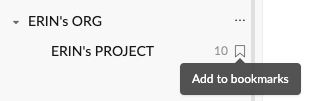
Peggy, Nov 22, 2019
Hi @eugene.shatilo - Thank you for the support! I totally forgot to inform you that we made this change!! 😭 I'm glad that you found it yourself! I also think hiding my projects away is a wonderful enhancement. My sidebar can finally breath.... To be honest, my sidebar was also pretty cluttered... 😜
I will close this issue. Feel free to open new threads for other suggestions!
Peggy, Aug 14, 2020