
① open My Tasks ② create new task ③ click on assign tags ④ no tags are available
Expectation is that global tags will be available but there is nothing there to select from.
Hi Joshua,
Because you're working alone without any teammates, it makes sense to apply the global tag for your personal tasks. However, if someone else works with a team, they might need a different set of tags. Think of personal tasks are your own private tasks and the project tasks are the ones you share with others.
You can still delete the tag for your personal tasks. Just like the other tags.
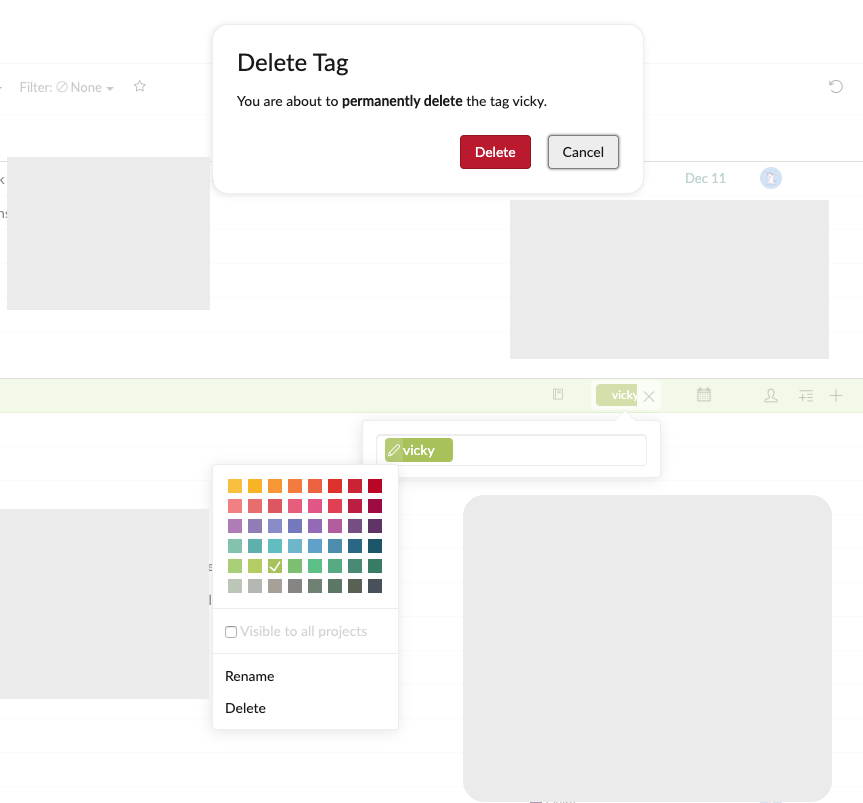
Deleting a tag on My Tasks is now only available on Web version though 😜
Vicky, Dec 3, 2019
Hi Joshua,
You can transfer the personal tasks to a project then apply the tag to those tasks.
Vicky, Dec 3, 2019
That's two steps and then must be done for each individual task 0_o
(deleted-OmuA), Dec 3, 2019
In mobile app, you can multiple select by swiping all the way from the right corner of the screen. That helps with the transfer process a bit maybe?
Vicky, Dec 3, 2019
Hi Joshua,
I cannot reproduce this bug based on your provided steps. Do you mind reloading the page to see if the tags show up?
Vicky, Dec 2, 2019
Oh I got what you mean 😃 Personal tasks cannot share the same tags with other tasks that belong to a specific project. Vice versa, the tags that are used for "personal tasks" will not be visible for project tasks.
Vicky, Dec 2, 2019
How am I supposed to set tags on these tasks?;?! I don't know what the tags are
Plus if I try to add tags , I'll end up making new tags that will not be the same as my global tags right?;?!
(deleted-OmuA), Dec 2, 2019
I mean the “personal tasks” can only have their own set of tags. “Global tag” cannot applied to “Personal tasks”.
You can just create new tag for your personal tasks, those tags can only be used for your personal tasks only.
Vicky, Dec 2, 2019
Oh no T_T If you create a tag in "My Tasks II" you can never delete it T_T It will forever exist as a filter option T_T
(deleted-OmuA), Dec 2, 2019
Yeah but if I wanted personal tags I would just not make them global.
I can't use the "personal tags" in any of my projects which means that the idea about using my tasks as a kind of in box is now not possible. All of the tags created in my tasks cannot be edited in a useful way to be filed in a project folder (dizzy)
(deleted-OmuA), Dec 3, 2019
Okay. Back to not using My Tasks. No probs. Was fine without it from the start. I thought it was gonna be the inbox solution but you can just do so much more by designating a project as an inbox.
If tasks made in "my tasks" must be assigned to a project before you can do anything with them, what is the point?
Might as well start them in a project folder anyways 0_o
Feel free to set this ticket as done.
(deleted-OmuA), Dec 3, 2019
If I make a "personal tag" then that will be different from my global tags 0_o
I'm trying to use the tags I use every day for everything.
All of my Project Folders use the same global tags.
(deleted-OmuA), Dec 2, 2019
But all my tags have been set to "global" They are not personal.
(deleted-OmuA), Dec 2, 2019
Yikes!! I thought it might be mobile only but I just went to test in the desktop (web app) and created a new task in My Tasks and then went to add a tag and it says "no tags available"
I just checked again in the mobile app.
It will not show available tags when creating a new tag in "My Tasks"
All of my tags are set as global tags.
(deleted-OmuA), Dec 2, 2019