
Hi,
I'm managing a construction project with several thousand tasks and deeply nested task hierarchies. For brevity, we often omit lengthy task names and stick with repetitive ones (like "1", "2," etc.). When viewing a filtered task list, however, it's difficult to know what we need to work on because we only see the brief names. It would be great if a full hierarchy were displayed somewhere -- in the detail panel on the right, as a light-colored path on the task row (perhaps for printed lists), as a tooltip, or somewhere else.
Thanks! Loving the product so far, in general!
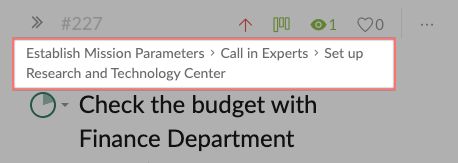
Hi @dschmidt13 , you could toggle on the Advanced mode by hitting Ctrl or Alt for Mac. This way you would see the path above the task name in the detail panel.
p.s. If you click on the path, it will direct you to that parent task.
p.p.s Thank you so much for your feedback! 😍
Peggy, 2020年1月17日
⭐️ We have closed your thread in order to optimize the performance of the Quire Feedback Forum. Please see our Quire Feedback Official Guideline for more information.
Peggy, 2021年10月20日
Thank you! That's great to know about! 😃
David Schmidt, 2020年1月19日