
Background info: my default view when I open up Quire is the My Tasks view, sorted by date. I am particularly interested in the "today" section, so that I can see what I need to do today.
The main problem with this is that the section will only show the subtask and the subtask title might lack the necessary context to quickly grasp what it is about. Consider this example hierarchy
Organize workshop for product plan [due next week] -- Determine participants [due at end of week] ---- Get feedback from product owners [due today]
Only the "Get feedback" sub task will show up in the today view, since its parents are due later. But seeing only this item is not enough, since the context only becomes clear once the parent items are known (i.e. that this is about a product planning workshop).
I know that I can click on each task and go to the corresponding project to see the hierarchy, but that means leaving the Today overview. I would love a way to see a list of the parent tasks right there in the overview.
My proposal: show the parents in the task details pane on the right. Then one can leave that panel open and quickly click on each task to find out what it is about.
That would be amazing. Thank you @peggy !
Secret_Fish, Jun 28, 2022
Thank you @peggy - that is what I needed. It would be helpful if there was a way to activate "advanced mode" from the UI, rather than having to use hotkeys. If I hadn't posted here then I would never have known about this feature!
Hauke Duden, Mar 5, 2020
I don't understand why I need to turn on advanced view to see this. I hate everything else about advanced view, especially the fact that I can't click the plus button to quickly add a task. This should be a separate setting.
Secret_Fish, Jun 24, 2022
Hi @Secret_Fish ,
Thank you for your feedback, I have escalated this to our team for internal discussion. We shall consider showing the parent task's path in the detail panel without toggling on the Advanced mode. Hope this will help. What do you think? 🤔
Peggy, Jun 28, 2022
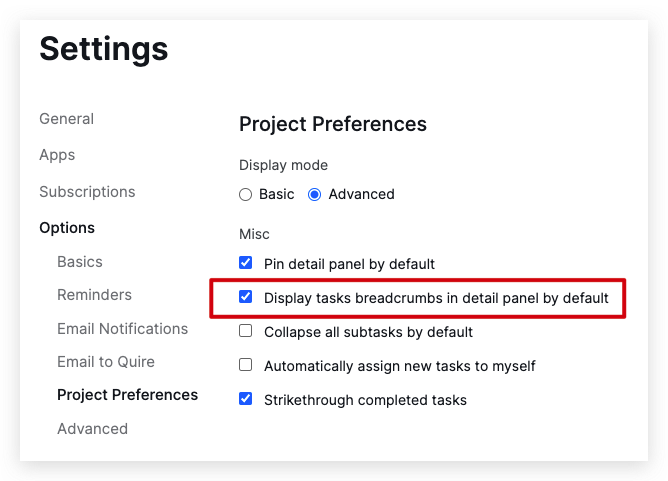
Hi @Secret_Fish, Good news! We have added an option to always display the task breadcrumbs in the detail panel.
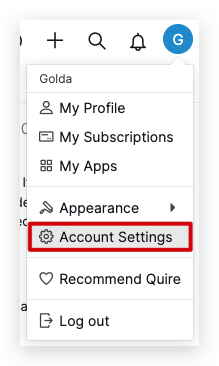
You can go to Account Settings > Project Preferences > tick the Display tasks breadcrumbs in the detail panel by default.
Golda, Oct 7, 2022
Hi @hdu , you can toggle on the Advanced mode to see the task path in the detail panel. Hit
CtrlorAltfor Mac. If you click on the parent task's name, it will take you directly to that parent task. Hope this helps.Peggy, Mar 4, 2020