
When I set a start_date for a task, but not a due_date, that task should never show as "Overdue"...because it doesn't have a due_date. It should always show up under "Today" (assuming now() >= start_date), but it should be after tasks with a due_date, and then in chronological order based on start_date.
Hi @waynevillars , we had fixed this. The tasks with a start date but not a due date will show under Today. Please refresh your Quire page and let me know if there are any questions. Thank you!
Peggy, Mar 25, 2020
Hey @peggy , I saw the change this morning. I was pleasantly surprised. Thank you.
However, the sorting logic still isn't quite right. What makes the most sense to me is to sort by due_date first, then by start_date. A picture is worth a thousand words so:
This is a screenshot from my actual "To Do" list. Specifically, it's the "My Tasks" section, sorted by Date, then Priority.

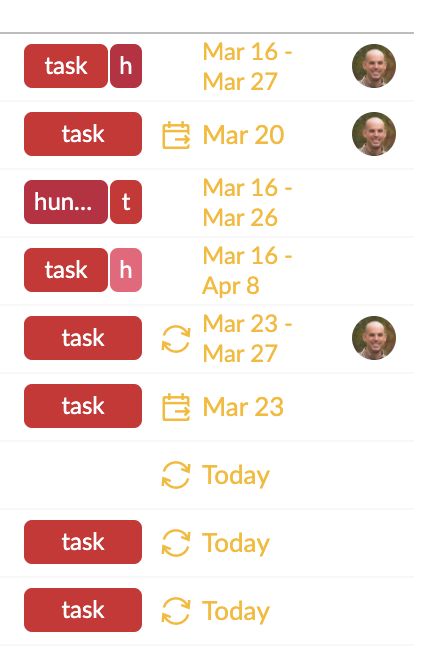
It seems logical to me that the order of the tasks in the "Today" section should be:
| Current Order | Desired Order | start_date |
due_date |
|---|---|---|---|
| 7 | 1 | none | Today |
| 8 | 2 | none | Today |
| 9 | 3 | none | Today |
| 3 | 4 | March 16 | March 26 |
| 1 | 5 | March 16 | March 27 |
| 5 | 6 | March 23 | March 27 |
| 4 | 7 | March 16 | April 8 |
| 2 | 8 | March 20 | none |
| 6 | 9 | March 23 | none |
Wayne Villars, Mar 25, 2020
Should I put that under a new ticket?
Wayne Villars, Mar 25, 2020