
When grouping entries by any of the week options, the date display for the week repeats the date. I.e. instead of "13-19 Apr", it displays "13-1913-19 Apr".
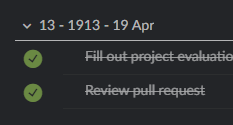
Hello again, Peggy. Not high priority, but just so know, the same issue presents in the Android app too.
Rikus Combrinck, May 11, 2020
Hi Peggy. Thanks for dealing with this so quickly and effectively! I can confirm that it's fixed. Much appreciated.
Rikus Combrinck, May 7, 2020
Ah! Well done! That's a rather unexpected variable. Thanks for dealing with that so quickly.
Rikus Combrinck, May 6, 2020
@rikusc - this issue had been fixed. You can switch back to English (South Africa). Please let me know if the issue persists! Thank you so much 🎉
Peggy, May 7, 2020
@rikusc - after some more testing, we found that this issue happens under language option: English (South Africa).
Our developer team is aware of this bug and is actively fixing it. Please kindly change to another English option for now. I will let you know once I have any updates from the team! Thank you for all the help and screenshots! 💪
Peggy, May 6, 2020
@rikusc - this has been fixed in the latest update version (v. 5.11). Please update to the latest version. Thank you.
Peggy, May 13, 2020
@rikusc - unfortunately, we weren't able to reproduce this issue. 😭
- Could you please be more specific on the filter that you have set? (Screenshot would be appreciated)
- And did this happen in My Tasks or a specific project?
- Does this issue still persists after your refresh your page?
Peggy, May 4, 2020
Hi Peggy, thanks for having a look. I remain impressed by your responsiveness and the commitment of your team to this excellent tool!
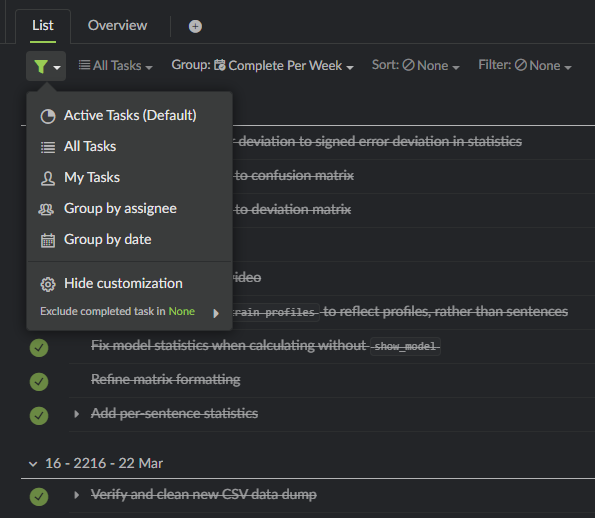
It seems to be any filter combination that involves grouping by date. I'm attaching screenshots that show filter settings.
It happens both in My Tasks and in various project views.
I've been aware of this issue for months. It's persisted over many page refreshes, cache and cookies wipes, Quire updates, and browser updates.
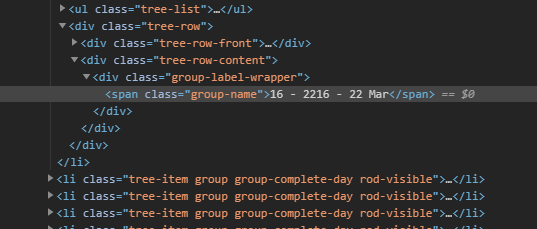
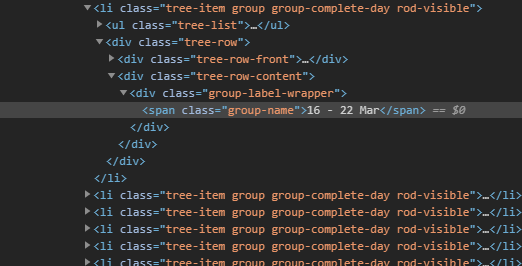
New information: it was strange to me that you were unable to reproduce the issue. It made me wonder if it could be something to do with my browser configuration. So, I opened Quire from a different, fresh browser profile and it did not have the issue!
I then tried recreating the issue by installing exactly the same extensions that I use on my default profile. However, I did not manage to recreate it on the other profile. So, I imagine it must be some obscure combination of settings that's responsible, but can't imagine what would cause something like this.
I'm attaching four screenshots. Two views of the same project from different Chrome profiles and the associated source viewed via Chrome's "Inspect" tool.
It would be nice to have this fixed, but I can't really expect you to work on it if I can't even recreate it myself! I'm happy to help test in any way I can.
Thanks, Rikus
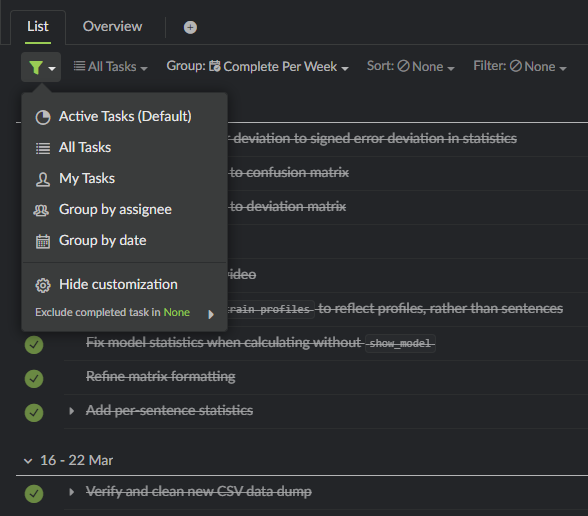
Rikus Combrinck, May 4, 2020
Confirmed — thanks!
Rikus Combrinck, May 13, 2020