
Hello. I've tried Quire and I like it although there are some things that I think might be improved.
No. 1 Please add an icon in the Columns found inside Boards that will instantly add a New Task (instead of needing to choose between Existing or New) or a better way is to just add a Text Box and when the User types in it and Enters, it will add a Task.
No. 2 I want to a Board to be seen right away instead of Task list (where the Existing Task are in) by default.
No. 3 I want the Overview to see statistics of Tasks to not be placed beside the Boards because it can be overwhelming to see it easily although my Boards aren't full of things yet because it's a new account.
No. 4 Even though Tasks in Existing Task List can be dragged to other boards, it is a little bit confusing since there's no dedicated board that will list all Existing Task automatically because what if I want all Task I create in Existing Task List to be always be in a Board but need to drag them one at a time for every creation. Maybe a main Board will help so that if I make a Task in Board it will automatically show in Existing Task List.
No. 5 The Hash or number symbol followed by a number seems to make weird text here in feedback.
Thank you for the clarification. 1. Solution is very good. I didn't know I could do that. 3. Apologies for not being clear. What I mean is that the Overview tab is very easy to access that it is overwhelming to see its details even though I can only see small numbers in it. So maybe the Overview tab can be placed to other place (still within view of the same page but not beside user-made Boards. 4. That might be nice. (However, my feedback is purely an opinion so please compare it with the majority / users / requests. Therefore, I understand that things must be thoroughly thought out first.)
jhdc, Jul 2, 2020
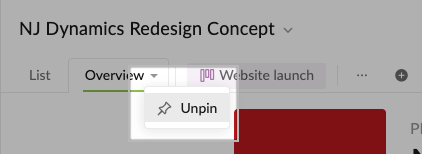
@howard.caluma - in our latest update, you can now unpin the Overview tab of projects. 🎉 Hopefully, this can be solution for your 3rd suggestion.
Peggy, Jul 3, 2020
@howard.caluma - thank you for your feedback.
You can select a task in the Board view, then hit
Enterto create a new task underneath that task. Note that the newly created task will be added as a root task in the List view.The default view right now is List view. However, if you viewing the Board view in Project A, when you switch to Project B and back, you will be directed to the Board view.
I'm sorry, I'm having trouble understanding this feedback. Could you please elaborate more or share some screenshots with us to help us understand what you are referring to?
Having Default board is in our consideration. We will need time to think about this.
Typing a
#then a number after it will become a task ID. It will refer to another task with that same ID in that project.Peggy, Jun 12, 2020