
The widget is very finicky and sometimes doesn't respond to any input, not even opening the app, so I have to open the app, then check that the widget has indeed done the action I told it to, go back to the widget, reload it, see that nothing has changed. The only way to make the widget change is removing it from the home screen, then adding it back again.
That seems to be fixed on the last update.
BrunoDSL, Aug 19, 2020
@peggy When the issue happens, the widget doesn't update no matter how many times you refresh it.
BrunoDSL, Aug 21, 2020
@peggy I seem to have run into another issue. As you can see in the screen shot, the widget is not organizing the tasks by date properly. Reloading doesn't solve it, not does collapsing the category. The task which is set to be due by August 27 was created using the app, then transferred to the the only project I have in my Quite.
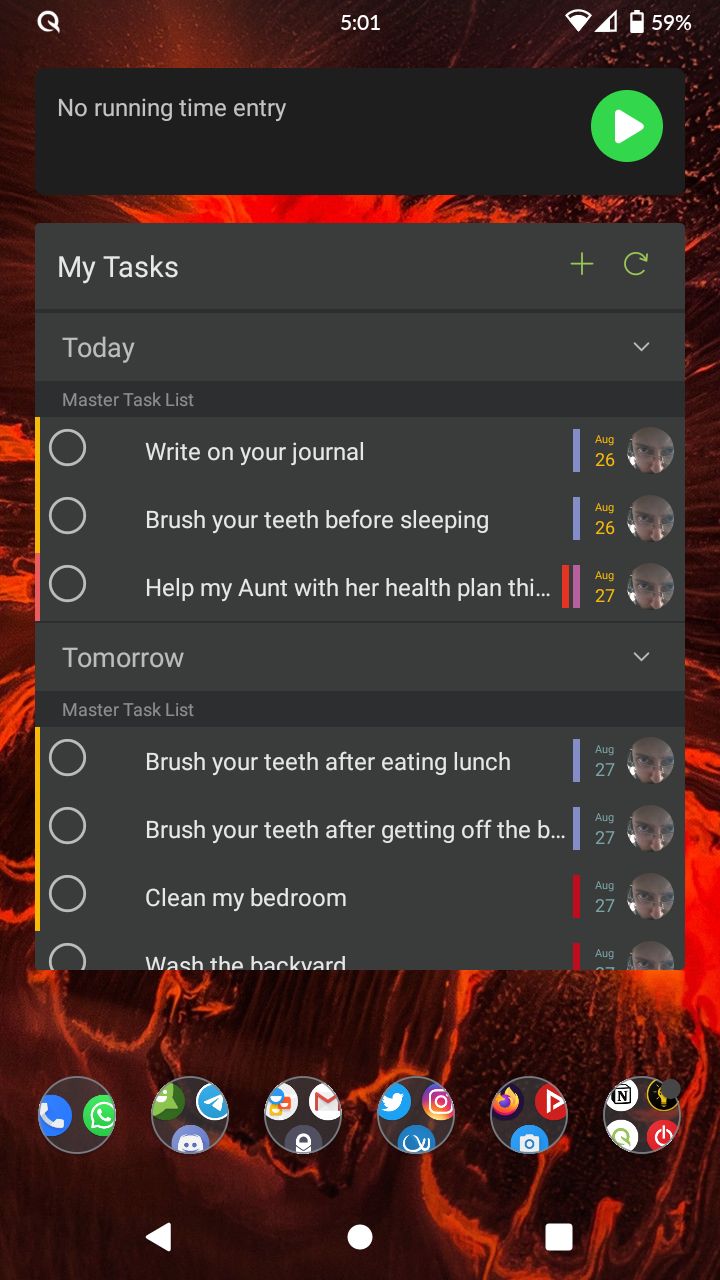
BrunoDSL, Aug 27, 2020
Hi @BrunoDSL - Thank you for the recording. I have gone ahead and passed it to our team for further investigation.
I, too, had encountered this issue on my Android device. I am guessing the reason is because I switch accounts frequently, causing the widget stuck at tasks of the previous account and tapping refresh button doesn't work either. But if I collapse and uncollapse a group inside the widget, then it would sync up right away, showing the correct tasks.
While our team is investigating this issue, please let me know if collapsing and uncollapsing works for you too?
Peggy, Aug 26, 2020
Hi @BrunoDSL - Sorry for late reply. Please let me know if the issue occurs next time. I will close this thread for now. Thank you.
Peggy, Aug 21, 2020
Hi @BrunoDSL - regarding below:
I'm not sure if the issue is related to the phone changing from portrait to landscape (since I have it set to do do). One thing I'll tell you that I can reproduce quite well. If you complete a task using the web version, the widget doesn't update and you have to remove it and add it again. What can also happen is that the widget responds to task completion without updating itself.
Is it possible to send us a screen recording so we can have a visual understanding of the issue happening here? Thank you for your help.
Peggy, Aug 24, 2020
BrunoDSL, Aug 26, 2020
@peggy I'll see if tha solves the issue the next time I encounter it. The issue is intermittent and I haven't figured exactly what causes it yet.
BrunoDSL, Aug 26, 2020
It's hard to tell wether the issue has been solved or not, thanks to the overall unresponsiveness and other issues I've been experiencing that I'm not sure are done by the widget or Quire itself.
BrunoDSL, Sep 23, 2020
Hi @BrunoDSL - This issue had been fixed in the latest version update. Please upgrade your Quire app to the newest version and kindly let us know if this issue persists. Thanks for your help.
Peggy, Sep 3, 2020
@peggy I'm not sure if the issue is related to the phone changing from portrait to landscape (since I have it set to do do). One thing I'll tell you that I can reproduce quite well. If you complete a task using the web version, the widget doesn't update and you have to remove it and add it again. What can also happen is that the widget responds to task completion without updating itself.
BrunoDSL, Aug 21, 2020