
Hi Crystal,
since yesterday we experience comments positioning themselves autonomously anywhere after posting them. How to fix this?
Michael
Hi Michael,
- I assume the comments are now in the correct order? If not, please notify us again with a screenshot of the task with the issue (eg. one of comments showing their time of post). Thanks. Btw, I do not have access to your task Lehrerinnen-Team.
- I see. I think it is because you zoomed in on the browser web page. 😃
Crystal, Mar 24, 2017
Hi Crystal,
- Time when posted appears now seemingly in a correct order, but I confirm the posts were not posted in this order (which is easy to find out by following the content).
- ?-Button > Got it. But: It was not the widths of the right panel but the fact the whole tab was slightly zoomed. Expanding the panel did not work even when expanding it to the maximum, but reducing the zoom to zero worked independently from the width. (Bizarre.)
Michael Praschma, Mar 23, 2017
Hi Michael, Got it. Yup, we are aware of the issue with computer clock. Thank you for pointing it out and the suggestion. 😃
Crystal, Mar 28, 2017
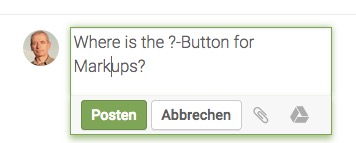
Michael Praschma, Mar 23, 2017
Hi Crystal, here come 2 screenshots. The comment coming from me and appearing at the top is clearly an answer given to the comment at the bottom. As to the time shown they seem in the correct order, but actually they are not.


Michael Praschma, Mar 24, 2017
Hi Michael, Thank you for the explanation. Let's say comment B should be below comment A because it is newer. Please let us know:
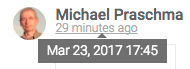
- The date and time when both comments A and B are posted. You will know when you hover over the time below the member name (see image below).
- The time zone of the two members who posted comments A and B, if they are left by two different members.
Thank you for your help and patience. Also, you said that there is another problem. Did you mean you cannot see the "?" button for Markdown? If so, you will see it when you expand the width of your detail (right) panel.

Crystal, Mar 23, 2017
Hi Crystal,
- OS Time: Actually, I did not control it when the problem appeared, but up to now I never experienced any offs. Time is automatically adjusted by Apple.
- As far as I can see, newest comments appear last at present.
Michael Praschma, Mar 27, 2017
Hi Michael, Comments seem to be working fine at my end (eg. appearing to be posted by members in the right order). 😞 Can you please explain a bit about what led to the issue, and give me a screenshot so we can look into it? Thanks.
Crystal, Mar 23, 2017
Hi Michael, Thank you for the screenshots. We have looked into it; since the time of the comment is based on your operating system's time, can you please let us know 1) did you notice if your operating system's time was a bit off when you posted the comment? and 2) are the comments working fine (eg. in the correct order) now?
Crystal, Mar 27, 2017
Hi Crystal, The problem appeared f.e. in our task Lehrerinnen-Team – ist is not visible by the time marked (i.e. XX Hours ago), but I repeatedly tried to answer to a last comment, and then this answer was not below it but seemed to belong to a comment several steps before. No way to avoid it. By the way, there's another problem (see screenshot).
Michael Praschma, Mar 23, 2017
Hi Michael, Thank you for the information. Good to know it is working fine now. We will come up a way to avoid such a case and should it happen again, please do not hesitate to let us know. Thanks again for your help and patience. 😃
Crystal, Mar 27, 2017
Hi Crystal, it's the computer clock! – I just caught another comment that appeared wrongly. And this time the time on the label was in the future! I'd suggest Quire should not take the time users have, but any normal time. Anybody with a computer clock that is delaed or tuned to another time zone causes a mess as long as this decides the order.
Michael Praschma, Mar 28, 2017