
As the title says. Getting really tired of navigating to a list or pinned sublist, and finding the right hand detail panel is no longer pinned. I then have to click a task, open the right panel, and pin it.
Then in a week or so when I open Quire again, same thing, it has reset.
Really annoying.
I wish I could set 'Always pin right-hand detail panel' across my entire Quire account.
Hi @jmorgan.nz - Thank you for your feedback. As it stands, when the browser cache is cleared, our system won't remember whether you have pinned the detail panel before or not, thus it will reset back to the default unpinned status.
Please let me know if you haven't cleared your browser cache in a week or so.
Also, I will let our Product team know about your suggestion for always pinning the detail panel at the account level. I will get back to you when I have more details.
Peggy, Nov 9, 2020
@peggy Wow awesome, ask and we shall receive! Thanks for being so responsive.
Jesse Morgan, Nov 12, 2020
Hey guys! @jmorgan.nz and @Lucian_Armasu 😝 Do you know there's a chance to win a One-year Premium Quire Account, Amazon US$100 Gift card and many other amazing goodies!! 🥳 Today's the last day to enter our holiday giveaway event! Details are here: https://quire.io/blog/p/giveaway.html
Peggy, Nov 24, 2020
I think another issue I noticed that I don't think should be expected behavior is that when I set the details pin in one org/project, it doesn't seem to be enabled for all the rest. If I have many other orgs/projects, that is kind of a pain to manage.
Lucian Armasu, Nov 12, 2020
Hi @jmorgan.nz and @Lucian_Armasu - We had added a new option in the Account Settings which let users to pin their detail panel by default.
Once this option is checked, all the projects' detail panel under your account will be pinned by default, unless you unpinned it later on.
If you unpin the detail panel, our system will still remember it, so the next time you come back to that particular list, it will still be unpinned.
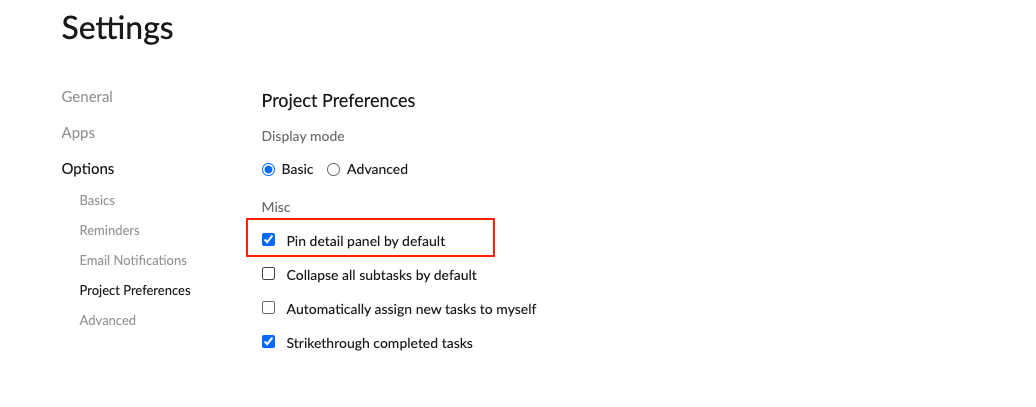
I hope this helps. Please let me know if you have any further questions in the meantime.
Peggy, Nov 12, 2020
@Lucian_Armasu Yes, it's very annoying. I also hate how if it's not in pinned mode, the task list has a fixed width with white(or black)space on the sides.
At least now that I know its stored in cache, I might be able to add a requestly rule to force the cookie to stay.
Jesse Morgan, Nov 12, 2020
Hnmm no go. The value is stored in IndexedDB
Jesse Morgan, Nov 12, 2020