
#394: Quire Feedback
Status: Completed
Hi,
How can I re-invite an external team member?
Created by Sam May 18, 2017
⭐️ We have closed this thread in order to optimize the performance of our Quire Feedback Forum.
Please see our Quire Feedback Official Guideline for more information. Thank you.
Peggy, Jun 4, 2021
Hi Sam, To re-invite an external team member, first go to Project Options and select "Manage external teams."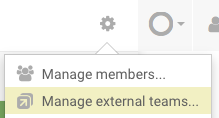
Next, click on the Edit icon of the external team you want to re-invite the member.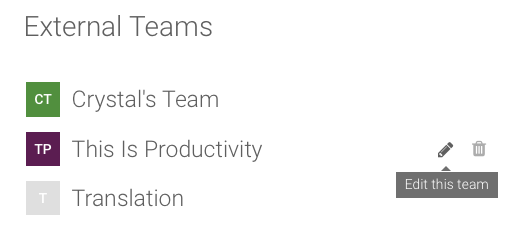
Then, you click on "Re-invite" below the member's email address.
Let me know if this helps. 😃
Crystal, May 18, 2017