
I love Quire, you have an amazing platform! I continue to have one major annoyance every day , 100z x/day .. I work on desktop, and I need to be able to pin left My Tasks and on right, Detail panel, and have them stay pinned/visible all day(!) I need to be able to see everything and even though I 'Pin' each, whenever I move to another task, subtask, etc., they close.. I have to open, pin.. hundreds of times per day. Is there a feature to permanently keep these left and right panels open? This is extremely annoying. It would be like using Evernote and then having the Notebooks and Notes column collapsing every time you switch to a new Notebook .. just a suggestion, maybe I don't know how to keep them open. Thanks.
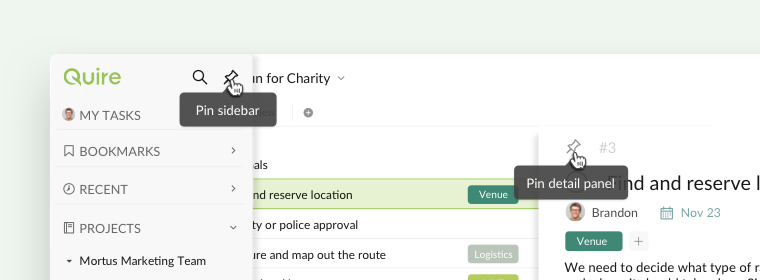
Hi @james.gavioli - Click on the pin icon to pin both the sidebar and the detail panel.
Once you have pinned the sidebar, then the sidebar will always be pinned. Even you open up Quire in a new browser tab, it will still be pinned.
As for the detail panel, our system will remember whether you have pinned it for each project and for each List/Sublist separately.
Please let me know if it's not the case. Thank you.
Peggy, Jan 18, 2021
i have pinned both sidebar and detail panel. but every time i close the browser, it back to unpinned state. so i have to re-pinning them again all the time each time i re-opening the browser. can you make this locked into setting? either cookies / the app itself? id prefer to save this setting into the app, so it will stay the same across platform.
sleeping panda, Mar 13, 2022
im using Chrome Version 99.0.4844.74 (Official Build) (64-bit)
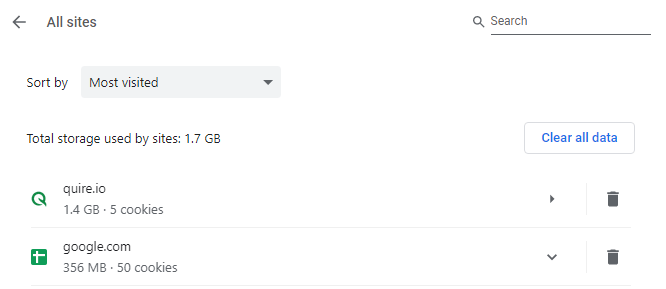
"please note that we save the pin state in the browser storage, once the browser storage/cache is cleared" I don't need to re-login if I'm re-opening the browser. I take that the session is still saved in the browser. i never cleared storages/cookies from the browser, but will my attachment helps?
sleeping panda, Mar 18, 2022
Hi sleeping panda, thank you for your update! I am glad that the issue has been resolved. I have also passed your issue to our team and we will keep an eye on this issue. However, if the issue happens again, please kindly let us know. I will close this thread for now.
Peggy, Mar 21, 2022
Surprisingly, now it automatically auto-pinned if I'm reopening the browser again. Thank you for your respond, Peggy!
sleeping panda, Mar 20, 2022
Hi sleeping panda, unfortunately, we weren't able to reproduce this issue you are facing on our end.
Could you please let us know the browser you are currently using that is having this issue?
Also, please note that we save the pin state in the browser storage, once the browser storage/cache is cleared, the pin state won't be remembered the next time you open Quire on your browser and that's the reason why the pin state doesn't stay the same across different devices.
Peggy, Mar 14, 2022