
i.e. what is the difference between a filter that only displays tasks with the label "urgent" vs. a sublist that only contains urgent tasks?
When should I use one over the other?
I'm happy to have the flexibility, but want to make sure I understand the best use case!
Thanks again for such a great product!
😃
Maybe i'm missing something, but couldn't I also do that with a filter? i.e. filters I create are only visible to me?
or do you mean the label I would need to apply to tasks to create the filter wouldn't be visible to everyone?
Yozza, Jan 29, 2021
@peggy Sorry if I wasn't clear. What I meant was that filters I create are also private to me?
Given both filters and sublists (optionally) can be private, I wasn't sure what the distinction you were making was?
Yozza, May 12, 2021
Thanks Peggy!
That makes sense, thanks!
I find sublists extremely handy, and really appreciate all the different combinations of features Quire has! Allows incredible flexibility and everyone to customise their use to their personal preferences!
I like to use sublists as a different "view" for different "categories" of tasks, while still having everything together in the main task list.
For example I can have some tasks collapsed in the main list, but have all relevant tasks expanded in the sublist.
This means I can have a "high level" view in the main list (so I don't forget something that's important!) and drill down to the details quickly and easily in the sublist 👍 🎉
Yozza, Jul 20, 2021
@peggy On further reflection, I've realised the crucial difference between sublists v.s. tags/filters: sublists include subtasks automatically, tags/filters do not. i.e. Subtasks automatically inherit the sublist, but not the tag, of their parent task.
That is, when editing from the main list:
- New subtasks (both new tasks and old tasks moved to subtasks) of any tasks in a sublist will automatically be included in the sublist of their new parent
- New subtasks (both new tasks and old tasks moved to subtasks) of any tasks with a tag will NOT automatically be tagged with the tag of their new parent
It hadn't occurred to me before, but this crucial difference means the way I use sublists wouldn't work with tags/filters. So I'm now even more grateful for sublists! 😂 🎉
Thanks again!
Yozza, Jul 21, 2021
@yozza - Sorry for the late reply.
When you create a new Sublist, you can set the Sublist to be visible to yourself. However, once it's set, you won't be able to change it afterwards.
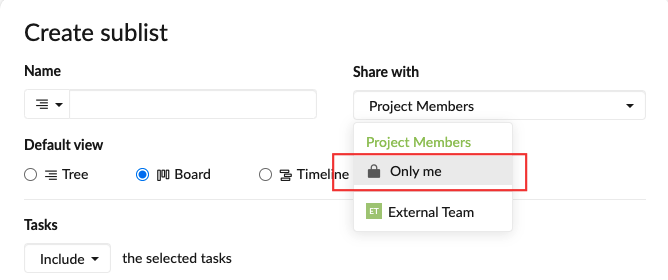
Peggy, Feb 18, 2021
Hi @yozza - Sorry for the late reply. To answer your question.
i.e. what is the difference between a filter that only displays tasks with the label "urgent" vs. a sublist that only contains urgent tasks?
A Sublist needs to be updated so the tasks will sync with main List. By that I mean, after the Sublist is created, if you another member added a task with the tag 'urgent', this task will not appear in the Sublist automatically.
Well... you may then ask, what's the point of having a Sublist if it doesn't sync automatically? You can think of a Sublist as another way to narrow down your main List. So for me, the main List is constantly updated by different team members involved in the project, however, not all the tasks need my attention, so I would like a way to control what should be taken care by me and needs my attention. I go over and the main List every other day and manually select the ones to add to my Sublist. (Of course, the Sublist is set visible to me only, so other people won't see it.) I'm sure there are other ways to use a Sublist, this is just how I feel comfortable using it. I hope it helps.
Peggy, Jul 8, 2021
Hi @yozza - One of the main point for a Sublist is that it can be personal, which means you can create a Sublist that is only visible to yourself. You can then switch between the main List and the personal Sublist to have the big picture of the entire project and focus on what matter to you the most at the same time. 💪
Peggy, Jan 28, 2021