
Whenever you create a new status, it auto adds it to every board. This can get pretty annoying as most boards might not need to have the status that was just created. Especially with boards where you are just wanting one custom status just for the one board.
Hi @peggy - Yeah, we pretty much figured out that the statuses are project wide. But the fact that it's auto-displaying itself to every single board we have on the project makes it a nuisance. Especially when we have to go to each individual board just to hide it when we only wanted the newly added status to only show up on one board.
Haloflooder, Jan 25, 2021
Hi @Haloflooder - This is noted. I will bring this feedback to our team and keep you posted when I have an update. Thank you.
Peggy, Jan 26, 2021
Hi @Haloflooder - Thank you for reaching out to us.
In our newest update, we have moved the statuses to the Project level, which means when adding a new status, it will be shared throughout the entire project. (No matter you added the status in the Board view or at the Project settings.)
So, if you didn't see the statuses in every Board you have, there might be a bug. Kindly check if you had the statuses hidden or not. If you still can't find them synced throughout all the Boards, please let us know.
Also, in each Board, you can hide the statuses that you don't want to see for yourself or for everyone in the project. Click on the Options icon at the upper right corner for each status to see the options.
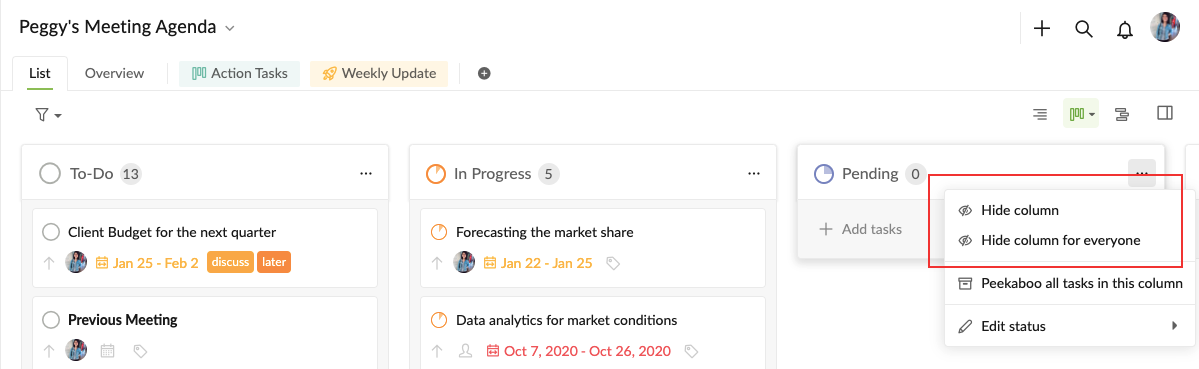
Please let me know if you have any questions. Thanks!
Peggy, Jan 25, 2021
After trying it again with another project. Adding a new status didn't seem to add it to all the boards another time and it would rather just add it to the board you are currently on. So not sure what the intended behavior is supposed to be like.
Previously, adding it through the board page itself via the right side where you click "add status". It added the status to other boards.
But this time, trying it with by clicking the drop down menu next to the project name and adding it via "edit statuses". It only added it to the board you are currently on.
Haloflooder, Jan 25, 2021