
There are days I open Quire on web and see over 70 notifications. Some notifications mention me, some are just new tasks or changes of task descriptions.
What I care about are notifications that mention me, but there is no way I can filter those.
I want to open those one by one, but if I click 1 noti, it will send me to that task and automatically mark all noti as read.
If I open it in new tab by using Command + Click, Quire does open that in new tab but also closes notification popup. When I open noti popup again, I have to go from the top and scroll down to find the last noti that I clicked and move on from there.
It's super inconvenient. That makes me wonder if the notification UX design is so bad or I am using it wrong somehow?
Hi @i.meisen - Do you mean you would like to filter the notifications in the notification panel to new and closed notifications?
Peggy, Feb 17, 2021
hi @peggy perhaps an additional "new and closed" tasks would be a welcome addition? These have my main interest
Ivo Meisen, Feb 5, 2021
@peggy when I use Command + Click on task name, it still closes noti pop up and I have to open it again. Could you double check that. Thanks.
Tung Le, Feb 3, 2021
@peggy yes, in case there are many notifications to check, keeping notification panel open after Command Click pressed in would be more convenient.
Tung Le, Feb 3, 2021
@tung.le - Yes, it doesn't matter if you command + click or not, the notification panel will close when you click on it.
Do you mean you would like the panel to stay open when you command + click on the task name until you close it manually (i.e. by clicking on the blank space of your workspace)?
Peggy, Feb 3, 2021
Hi Peggy, an option to select what notifications you would like to receive would be a nice addition. For example, I'm getting notifications when tasks are moved or when tags are added. Examples that make the notification list and email unnecessary long. thx!
Ivo Meisen, Feb 1, 2021
I'm having the same problem and this is going on for a long time already. I think the notification system is to limited compared to the rest of Quire. Also you can't set different notifications for mail and "in app". This morning I had a notification email with 255 items listed, only from yesterday....
Ivo Meisen, Jan 29, 2021
Hi @tung.le and @i.meisen - Thank you for your feedback.
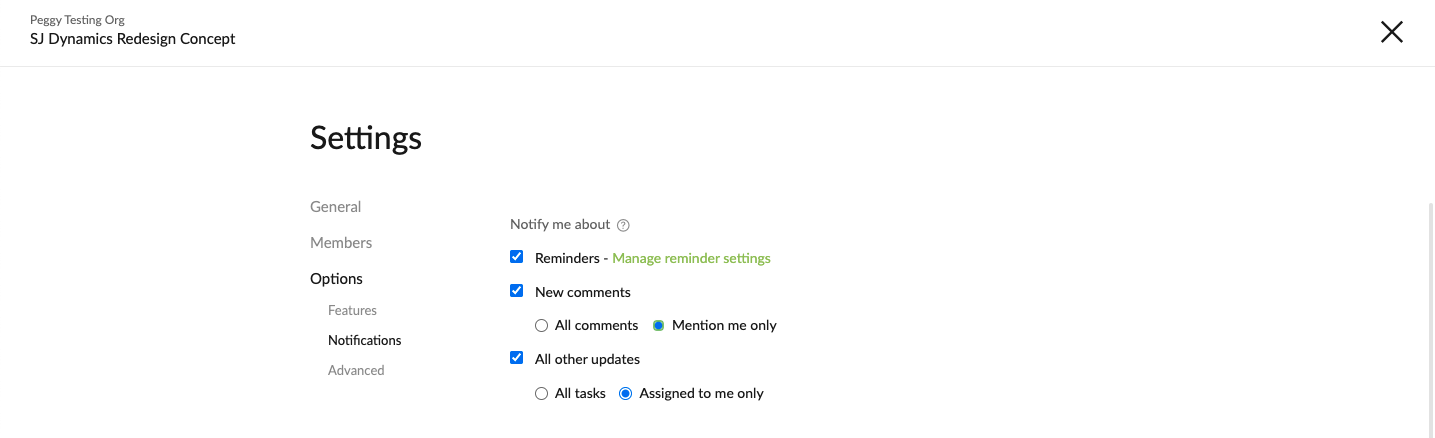
You can set the notifications to only remind you about tasks that mentioned you and are assigned to you in the Project Settings page.
Dropdown menu beside the project name > Options > Notifications
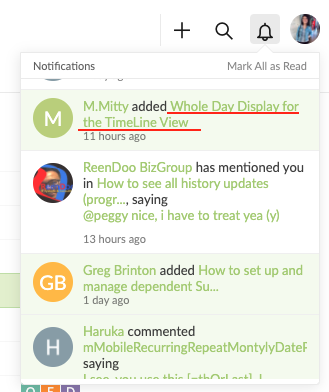
For opening up the tasks in another tab, you need to click on the task name in the notification while using Command + Click. (See below screenshot)
Anyway, I will pass your feedback to our Product team and let them know about your frustrations. Please let me know if you have any other question. Thank you!
Peggy, Feb 1, 2021
@i.meisen - For notifications about when tasks are moved or when tags are added, they are categorized in the All other updates category.
Do you mean you would like to have a detailed list of options of what kind of notifications you would like to receive or not?
I can understand the use case of this, however, we are concerned that the options might be too overwhelming for most users, that's why we try to narrow the options down as much as possible. However, I will still let the team know about your feedback!
Peggy, Feb 3, 2021