
#4187: Quire Feedback
Status: Completed
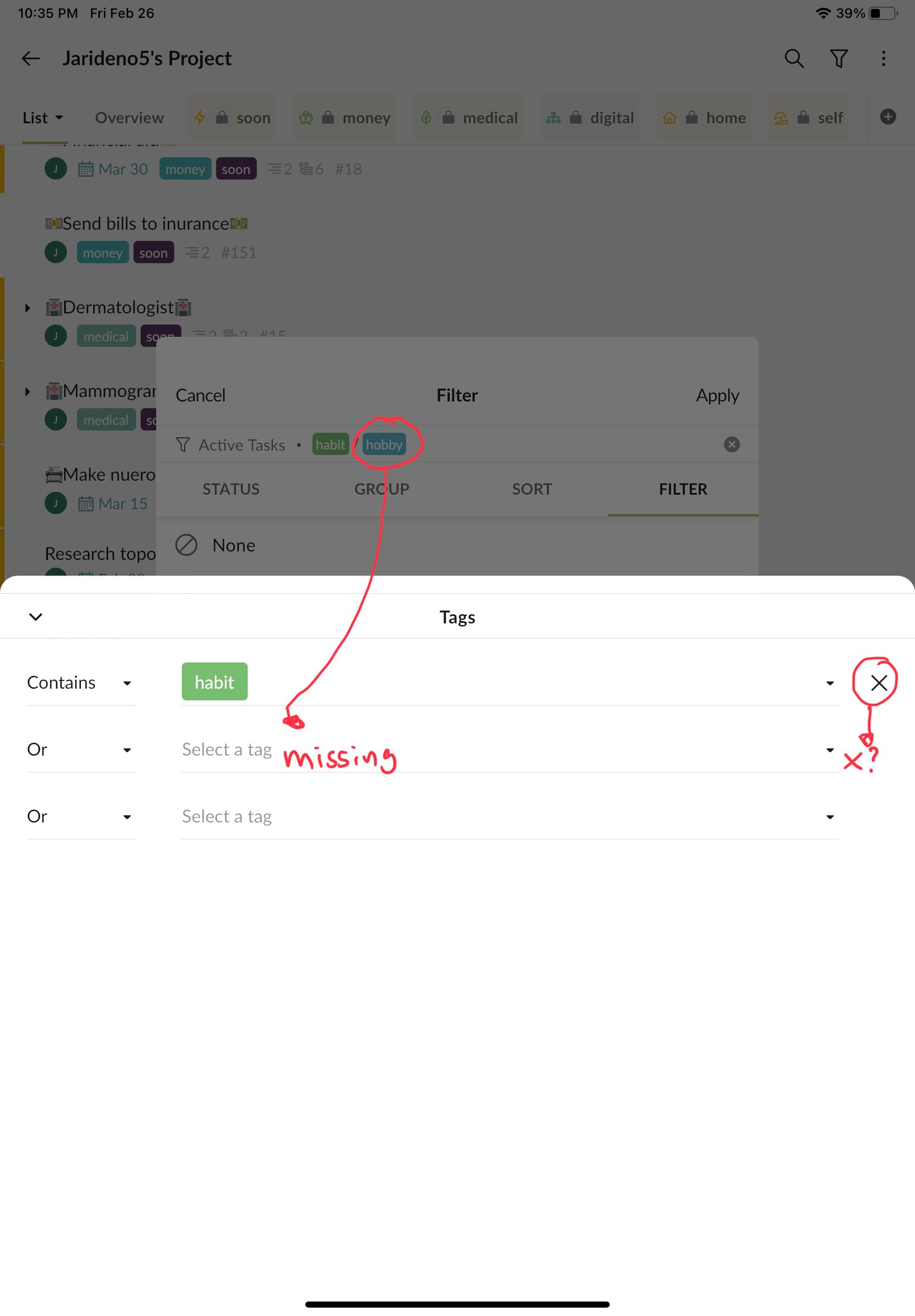
Bug: when filtering by tag using the "or" option makes 2nd, 3rd...etc tags dissappear. See image for details
Steps to replicate:
- go to filter icon and select customize 2.choose “filter” in the header 3.select the filter by tag option 4.select a tag 5.choose the “or” option 6.choose another tag it won’t show up in the window you are using , but it will show up in main window 7.also there won’t be an “x” next to the second tag so you can’t deselect it 8.same thing happens if you select both tags first and then choose the “or” option. The second tag will disappear 9.see image for more clarification
Via Quire iOS
Created by (deleted-x5AM) Feb 27, 2021, Edited Mar 10, 2021
@Jarideno5 - This issue had been fixed in the newest update. Please update your Quire app to the newest version (6.08) and kindly let us know if the issue persists! Thank you again.
Peggy, Mar 10, 2021
Hi @Jarideno5 - Thank you for your issue report! I have passed this information to our Mobile team. The team will look into it right away. I will let you know once I have an update. I'm really sorry for the inconvenience caused.
Peggy, Mar 4, 2021