
In web app
- Edit the name of the status To-Do to be Planned
- Create a filter on the list for planned and group and sort by date
- Save the filter as catch up
Mobile app (Android) 4. Open the app on Android mobile 5. Select the saved filter (catch up) 6. Notice the name is not preserved in list
There is also some other buggy behavior with saving and modifying filters in mobile from this point. Even from the mobile app selecting the planned status will eventually show up as To-Do in the mobile app, when that filter is selected.
I'm thinking something is incorrectly hard-coded in the mobile app itself, centering around some enumerations for status. And if the filter fails to relate the status properly, it probably has an effect on the display which may be the cause of two other issues that are open that I logged recently.
Without looking at the code I can't be certain how it's working at all, but that's just my guess.
Via Quire Android
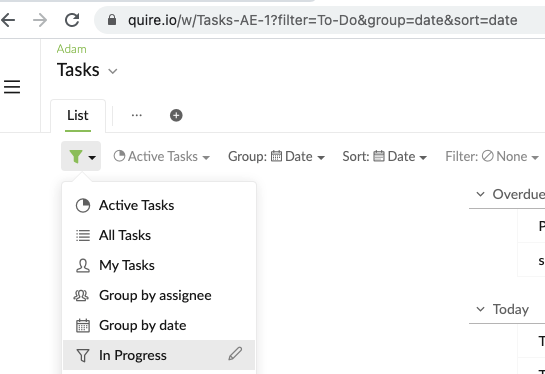
Attaching a screenshot of just webapp, newly-created filter. All I had to do was select a different filter, and come back to it a couple times back and forth, and it looks like it's a bad link.
(deleted-VTl~), Mar 8, 2021
@Adam_Edison I have passed this issue to our team for them to investigate further. If I have update from them, I will keep you posted. I am really for the inconvenience caused.
Peggy, Mar 12, 2021
Hi @Adam_Edison - This issue has been fixed in the newest version update (version 6.10). Please update your Quire app and kindly let us know if the issue persists.
To play it safe, I would suggest you delete the already saved custom filters on the web browser first and let them re-sync to the mobile app. Then continue to add the filters back. It should sync between two devices this time. Thanks for your help!
Peggy, Mar 24, 2021