
#4233: Quire Feedback
Status: To-do
Hello,
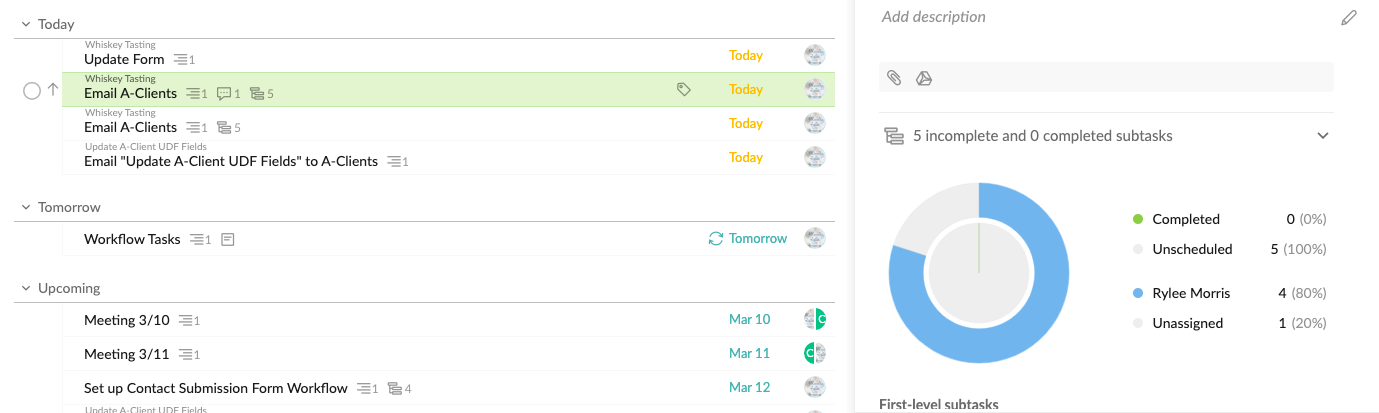
Is there a way to make the pie chart NOT show in the side bar? For example, when I go into my list tab, group by date, and then double click on a task that is associated with other subtasks or a parent folder, the side bar to the right opens, and there is a pie chart, and then the list of subtasks below it. Is there a way to remove the pie chart?
Created by Rylee Morris Mar 9, 2021, Edited Mar 11, 2021
Hi Peggy,
Yes. The pie chart isn’t needed. I have so many tasks and checklists, the pie chart does nothing for me. Especially in the side bar, it’s just a big thing in the way. I already have a pie chart in the overview, which I don’t use either.
Rylee Morris, Mar 11, 2021
@VirtuallyRylee Thank you for your feedback. At this time, you can only collapse the section. Then it will stay collapsed even if you click on other tasks. I hope this helps.
Could you please let us know if you think the pie chart is too redundant or other reasons that you want it removed? Thanks!
p.s. I have slightly edited the feedback title to better reflect your suggestion. I hope you don't mind.
Peggy, Mar 11, 2021