
Dears, I am quite new user. But I understood Quire very quickly. Excelent, I am very satisfied. There can be a log information concerning project/task - important information on "Description" field, many comments that are relevant for understanding status of the TASK/PROJECT. Excelent for documentation of progress. Questions: 1.) is there possibility to somehow export "everything" written within the TASK/PROJECT into e.g. PDF format that can be taken and sended to anyone who is insterested to see complete documentation of the TASK/PROJECT? Of course without conted of enclosed files to task/comment. As far as I know there is only possibility to print (also to PDF) list of tasks. But without "Description", comments, list of enclusures. If answer to my question 1.) is NO (which I assume) another question: 2.) Is such functionality planned to be developed?
I think this is the only one functionality that I miss in your (really excelent) project (application).
Thank you very much for your answer Libor Nosek Czech Republic
⭐️ We have merged your feedback thread with #327 to consolidate all similar feedback on one main thread.
Peggy, Mar 17, 2021
Hi @Nosek_Libor - At the moment, printing out a single task isn't available. However, it's in our consideration tp have this feature in the future. I will let you know when we have more information regarding this request. Thank you for your feedback!
Peggy, Mar 17, 2021
Hi Nosek - You can now print the detail panel of a task! You will find the print option in the detail panel > More Options icon. Please let us know if there's any questions. Thanks!
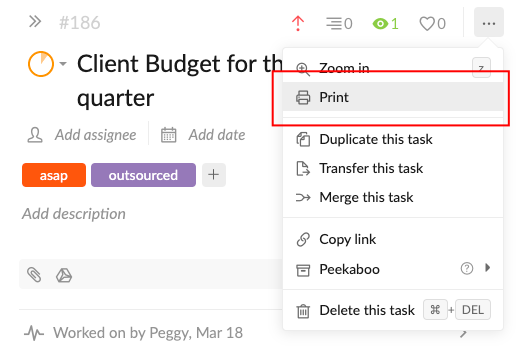
Peggy, Apr 14, 2021
Thanks Peggy. I will try and give you a feedback.
Nosek Libor, Apr 15, 2021
@peggy Thanks for feedback. It is nice to see that I'm not the only one who search such functionality. Have a nice day...
Nosek Libor, Mar 17, 2021