
Hi @Thomas_ - No matter in My Tasks or a certain project, you won't be able to change the percentage of the Completed status. It is set to 100% as default.
Peggy, Apr 1, 2021
Ah, I see, thank you, that makes sense. Could it be made more visible or identical to how it is accessed in projects?
Thomas, Apr 1, 2021
Hi @Thomas_ - You can now find the editing options for statuses when you right click on the a task > Set status.
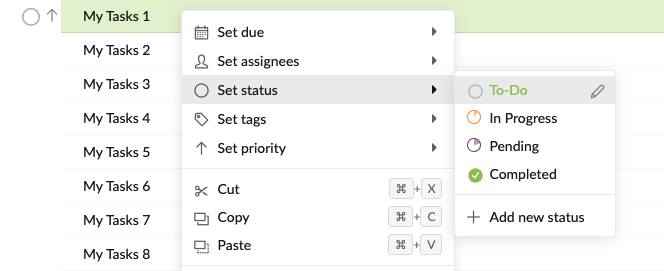
Or when you right click on the status circle at the left hand side of the task name > Set status. I hope this helps.
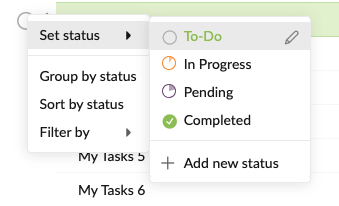
Peggy, Apr 7, 2021
Can't change the percentage for Completed. Rather hidden, maybe make it the same as in projects?
Thomas, Mar 30, 2021
Bump.
Thomas, Apr 5, 2021
Hello?
Thomas, Apr 1, 2021
Thanks, this is resolved.
Thomas, Apr 11, 2021
Hi Thomas, I will close this thread. Thank you.
Peggy, Apr 12, 2021
Hi @Thomas_ - In My Tasks, you can edit the status in the detail panel. Click on the drop down menu arrow beside the status circle and hover over a status for the edit pen icon to show.
Peggy, Mar 30, 2021