
When I create a new task, by default, it gives it the date of the last task. However, this can be detrimental since that date is likely incorrect. If a task has no date, then you know to correct it, but if they default to a wrong date and you forget to correct it, you have a problem. there should be an option to turn this off, or turn off default dates in their entirety.
I am grouping by tag and sorting by date, and when I click on the + icon in the group (and supposedly for any group that isn't date), the task will default to the date of the last task. So I would imagine that the reason why it defaults to the date of the last task is because it's sorting by date. So adding a new task gives it a date which puts it at the end when sorted (that is while the date isn't being determined by group).
I now recognize what is happening, but I still stand by what I was saying before that defaulting to the date of the last task can have some problems. Here are my specific suggestions:
- Have an button/option to create a task that creates a task without any tags, date etc. The button on the top right corner does not do this. This should be independent of whatever group you are currently clicked on.
- Sorting should not have any effect on the defaults of the task that is created. So if you're sorting by date, a task should default to no date.
I think that, when creating a task in a group, the task should default to something in the group. When it comes to date, it might be weird to make it default. Though, I do see that when grouping by date, it doesn't default to any date with no sort and no filter, so this would work as is (but if it does do this, it should be put into a group according to the default. If a task is created which has no default date, when grouping by date, it should be put in the "other" group. And if you change from the default group, the refresh button should pop up to move the task)
Jonathon, Apr 21, 2021
Hi Jonathan - Thanks for your explanation! I will let the team know about your suggestion and keep you posted!
Peggy, Apr 26, 2021
Hi Jonathan - We have made a small enhancement: You can inline type in <none> to the due date will be set to none even if you are adding a task in grouped/sorted mode. I hope this helps at the moment. Thank you!
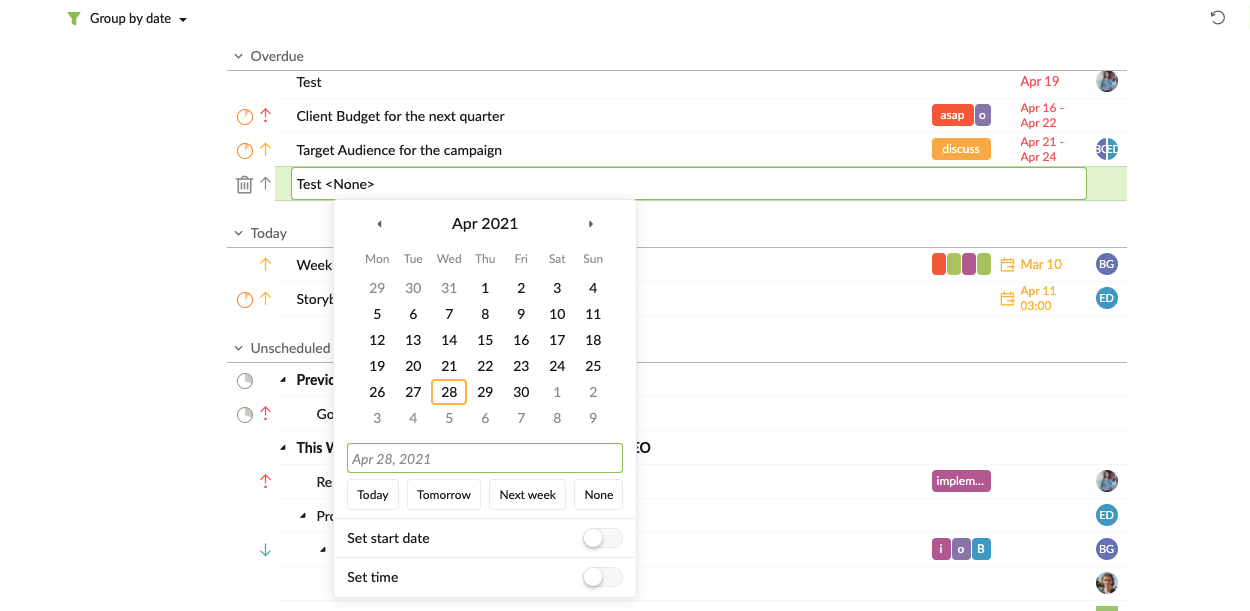
Peggy, Apr 28, 2021
Hi Jonathon - Thank you for your feedback! I will pass your suggestion to our team.
Please allow me to explain the spec we have now so our team won't mistaken your request. I'm not sure in what filter/group mode you are creating new task; however, for example, if you have grouped your tasks by Date, and clicked on the + icon in the 'Today' group, the newly created task will automatically assigned to Today. Is this what's happening for your case? Or are you facing something different?
Are you expecting the task to have a blank date and not assigned to 'Today'? Thanks for your answer.
Peggy, Apr 20, 2021