
I have Quire installed on my phone and PC. But for some reason, it shows different values on both devices (see attachments).
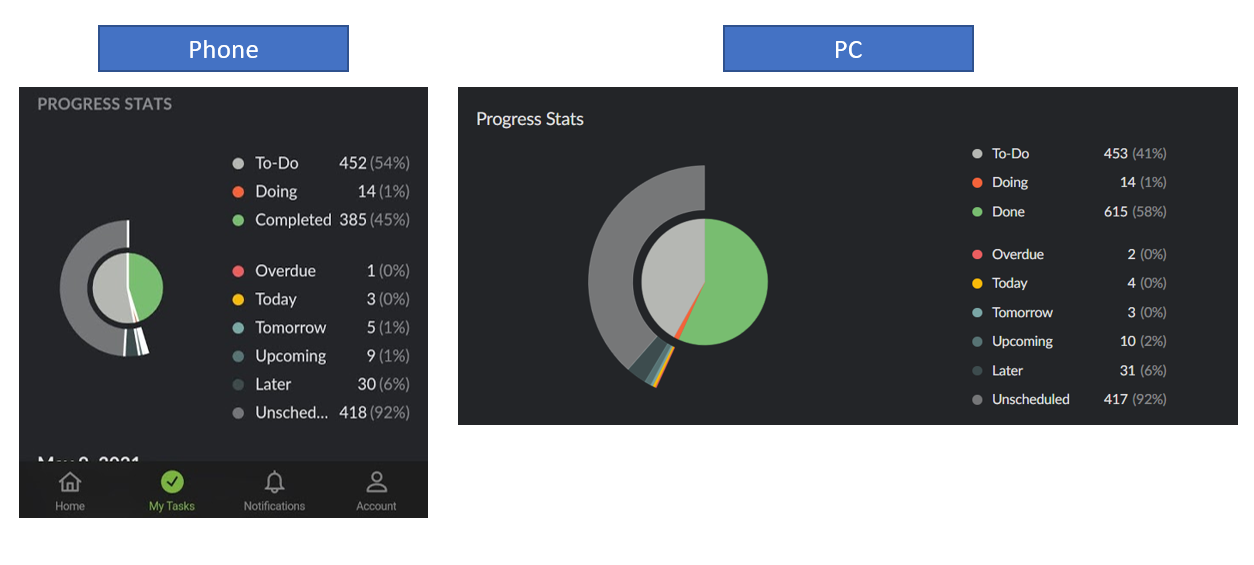
While the phone screenshot is two days or so old, it doesn't count all my tasks for some reason (some tasks were added in the meantime, yes, but I definetly didn't add 300 tasks in these few days).
Still doesn't work 🙁I cleared the cache, then the data. Upon reopening the app, I had to sign in again, which I did... but the numbers are still different.
coderic, May 7, 2021
Hi coderic - Sorry for all the trouble! 😱
But could you please kindly check on the web version; to see how many tasks you have in total? Switch to 'All Tasks' and then select all the tasks; kindly let us know the total number of tasks you have. Thank you for your help!
Peggy, May 7, 2021
Hi, no worries, it's nothing that's annoying me too much, I'm just curious why this happens. On my phone, it says 720 tasks in total, on my laptop, I don't quite know how to select all tasks; I don't see that option anywhere...
coderic, May 7, 2021
Hi coderic - Thank you for the screenshots.
I'm sorry that you have encountered this issue; I have passed this issue to our team. Unfortunately, we weren't able to reproduce this issue on our side. 😭
Could you please kindly pull down in the List tab for this project on your mobile app for the project to refresh and check if the Overview stats matches with the web version? Thank you for your help!
Peggy, May 6, 2021
Hi coderic - Thank you! I will pass this information back to team and let you know if we have any updates regarding this. Sorry for the trouble 😭
No, you don't have to anything, the stats should be in sync on both devices; and it should definitely sync since you have manually pulled down on your My Tasks List tab on your mobile device, that's why we are finding this issue very strange... 😞
Peggy, May 7, 2021
Hi coderic - For the web version, you can hit Ctrl + A to select all the tasks. Please make sure to switch to 'All Tasks' first. You can then see how many tasks you have in total at the bottom menu bar. Thank you for your help!
Peggy, May 7, 2021
Hi coderic - This is noted, I will let our team know!
Could you please kindly send us a email of consent to support@quire.io? As we may need to access your task/task activity log to find out what's happening, please kindly write in the email stating that you give our developer team permission to access your project. Thank you for your help! Once I have more updates from our team, I will get back to you!
Peggy, May 11, 2021
Hi coderic - I'm sorry, our team still couldn't reproduce this issue on our end.
Could you please kindly clear the storage data and cache in your phone's settings? And kindly check if the stats will be in synced with the browser version?
![[mobile] clear cache and data.jpeg](/att/Co/EzB2mMmJDSJ3ItT85L7zpPxC/6651imud/%5Bmobile%5D%20clear%20cache%20and%20data.jpeg)
Peggy, May 7, 2021
Hi Peggy,
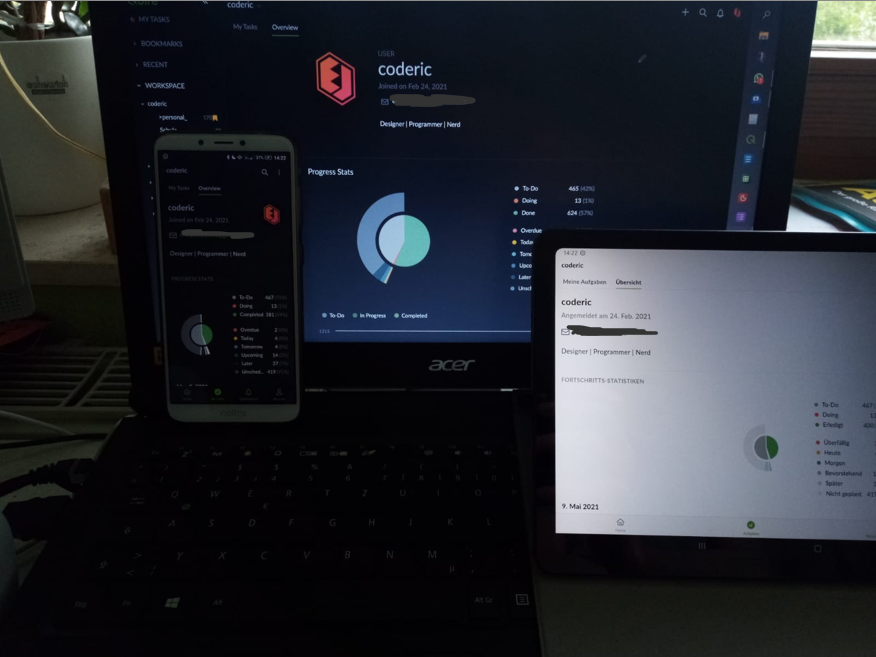
so, I still have this issue. Weird enough, it's different on every device?!
It's probably kinda hard to see, but it differs even from phone to tablet... I have installed Quire Beta on both mobile devices, both from the Play Store, both up-to-date.
coderic, May 6, 2021
Hi again. So on the web version, it says 1105 tasks in total... I don't know why the phone has less though... There isn't some sort of opt-in for the different boards, right? Like I don't have to explicitly set my phone app to show all tasks in the overview, do I? Or is it possible that old tasks are not synced to the phone? Maybe ones I completed before getting the mobile app?
coderic, May 7, 2021