
When I have multiple notifications, and I look at one of them, all of the others are then marked as read. This makes it hard to tell which notifications are old and which I haven't looked at yet.
It would be nice to only mark as read those notifications that I've actually clicked on or looked at.
Hi Mark, Let's say you have a new notification. When you click on the "notifications" icon in the upper-right, you will see that the "new unread" notification has a "green" background color. For the "old unread" notification (aka one that you have not clicked on or looked at), it will have a "light green" background color. As for the rest of the "read" notifications, they will have a "white" background color.
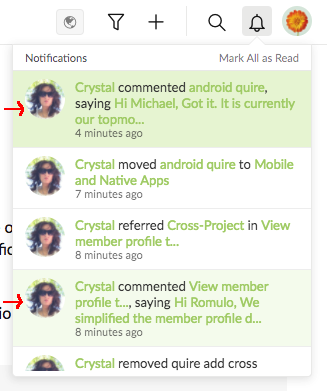
Let me know if it is the case for you. Perhaps you think the light green is not obvious enough? Or, you are using the dark theme (as there is a bug in the notification background color)?
Crystal, Jun 28, 2017
Hi Crystal. I have had this problem too, several times. I will try to work it out what the steps are to repeat.
However when i tested just now the problem did not appear on the web interface. It worked as it should - the ones i looked at cleared themselves and the others were still highlighted.
However when i use the Android app, the highlighted notifications i click on do not change color. Maybe there is a bug there.
Andy, Apr 27, 2018
⭐️ We have closed your thread in order to optimize the performance of the Quire Feedback Forum. Please see our Quire Feedback Official Guideline for more information.
Vicky, Apr 22, 2021