
Hi Peggy,
Thanks for all your work coordinating with the team on our feedback.
When I click a task and select "Merge to...", I get a popup that populates with both active and completed tasks. My project has been ongoing for long enough that there are more completed than active tasks in this list. I can only think of instances where I would want to merge two active tasks. Maybe active items should take precedent? Is there a setting I can change for this?
Another option might be for me to delete older completed tasks. Are there any ways to delete tasks completed before a certain date. For example, now that we're into Q3, can I delete all tasks completed before Q2?
Thanks again! Chris
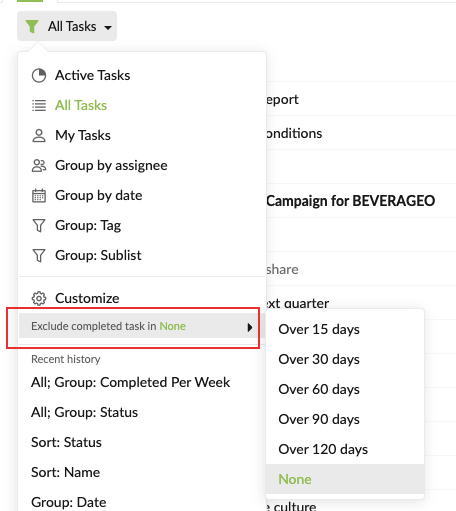
Hi CBroz - Sorry for the late reply. I am guessing the reason why you cannot see the older completed tasks is because we have excluded them by default.
Please change the option to 'None', then when you are in All Tasks, the older completed tasks should appear. I hope this helps.
Peggy, Jul 27, 2021
Hi Chris - Right now, when merging two tasks, it will show all the tasks (including active and completed tasks). However, I think your suggestion make sense. I will let our team know about your suggestion and keep you posted if we have more information on this.
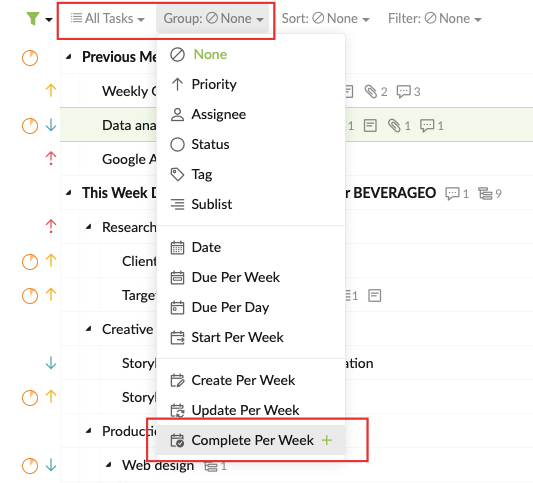
About deleting the older completed tasks, you may try to filter your tasks by 'All tasks, Group by Complete per week', then multiple select the tasks that you would like to delete. I hope this will help.
Peggy, Jul 21, 2021
Hi Peggy,
This helped, but didn't quite solve my problem. I was able to delete more completed items, but others remained in the 'Merge' popup. I played around some more to find I had completed peekaboo tasks which, counter to my intuition, did not show up under 'All Tasks'. These are items I'd been peekaboo-ing as part of my board view sublist. Now that I've deleted all the peekaboo completed tasks, the merge list is much cleaner.
I'd still support my initial suggestion of only offering (or prioritizing) merges with incomplete tasks. Maybe peekaboo would make more sense to me as excluded from 'All' if it were called 'Archived'? 'Peekaboo' highlights the temporarily-hidden functionality, but maybe that should be separate from the archiving that is offered in the Board view (Peekaboo all tasks this column).
Thanks for your help and your continued work on the platform!
Chris
CBroz, Jul 27, 2021
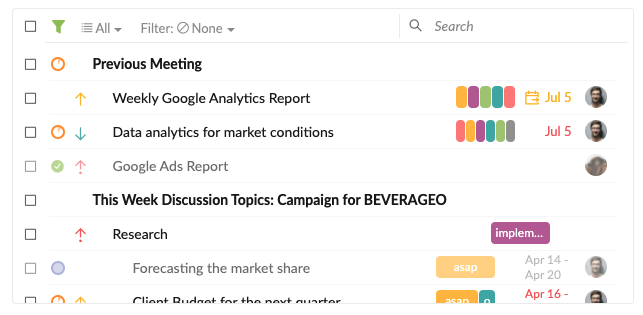
Hi Chris - I have passed your feedback to our team and we are considering to enhance our task picker for merging tasks. We are thinking about making it more like the task picker you see when you create a Sublist. (Maybe something like below, where you can filter the tasks.) I will keep you posted when we have an update for this.
Peggy, Aug 11, 2021
Thanks! I'll use the grouping feature for a mass delete ☺️
CBroz, Jul 21, 2021
I just went to delete completed tasks, but I was only able to load/delete recently completed tasks, within the last week. If I set to only view completed, I see nothing. But, when I go to merge, I still see much older items, and they remain in the JSON/CSV source files. Any tips for seeing/clearing what's there? I could download the source files and edit there, then reupload, but I'm hoping there's an in-app solution.
CBroz, Jul 22, 2021
Interesting thanks
CBroz, Aug 11, 2021