
Hello there, I just wondering that would be great if you align tags with each other and don't let them be sorted like a list.
For example:

Hi Alireza - Noted, could you please share the reason why you would like the tags to be aligned that way in the tag picker? I will pass your feedback to our team for discussion.
A small tip: You may press # when a task is selected and use the up/down arrow to choose the tag. This way, you won't need to select the tags via a picker. I hope this helps.
Peggy, Aug 11, 2021
Thanks for your tip @peggy But even you choose them from # it won't be listed that way I told you. And the reason is, when you have more than 7 tags, it won't shows them at the first look and if they align together, you don't need to scroll down to view all of them, you simply can choose between one or more than of them, with just a quick look — better accessibility.
(deleted-RpXG), Aug 11, 2021
@Peggy Of course. I appreciate.
(deleted-RpXG), Aug 11, 2021
@peggy Thanks peggy. No I mean when we want to select them. They are listed like this:
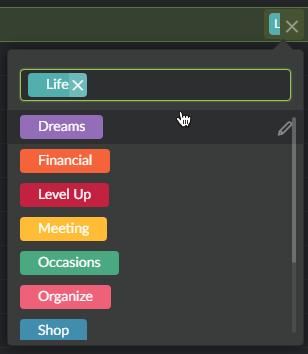
(deleted-RpXG), Aug 11, 2021
Hi Alireza - Okay, I will pass your suggestion to our team and keep you posted if we have any changes or updates regarding this.
Peggy, Aug 11, 2021
Hi Alireza - Thank you for your feedback. When you assign tags to a task, they will shown like the below in the task detail panel. You may press the spacebar to open the detail panel of the task.
Peggy, Aug 11, 2021