
Hi Kiran - Could you please kindly share more details on what you are looking for? We are not sure what you are referring to.
If you want to copy the link of a task, you can go into the task's detail panel and click on the More Options icon at the upper right corner, then click 'Copy link'. Hope this helps.
Peggy, Sep 10, 2021
Hi Kiran - In the Quire Chrome App, you can click on the three dots icon at the upper right corner of the app to Copy URL. This way, you don't have to visit the edit page every time you want to copy the URL. Hope this helps.
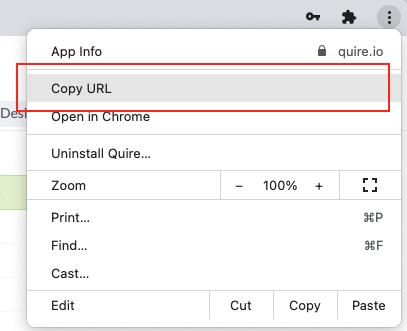
Peggy, Sep 15, 2021
Hi Kiran - Thank you for your screenshot. To copy the link of the organization or project, you can simply copy the URL from your browser address bar. You don't have to go the edit page for each organization/project. I hope this can save you several clicks.

Peggy, Sep 14, 2021
Yes, you are right if I'm using the browser, I have installed Quire Chrome App which does not show that and so I have to visit edit page. Would be great if any other method available for the chrome app.
The links are important because when we refer to the task/project. in particularly links of tasks should be easily available always.
Thank you very much for the response
Kiran K Telukunta, Sep 14, 2021
even for the task if this exists .. it will be great
Kiran K Telukunta, Sep 12, 2021
Hi Peggy, If you see the image, it is the description of a project and which there is the link of the website. But if I want to copy the link of the project what is the method?
if there is a copy to clip board icon beside it, this will be great.
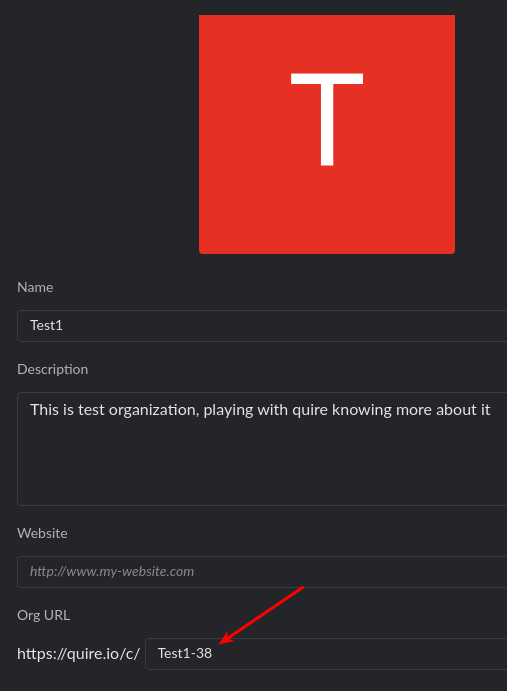
Kiran K Telukunta, Sep 12, 2021
Yes thank you
Kiran K Telukunta, Sep 16, 2021